

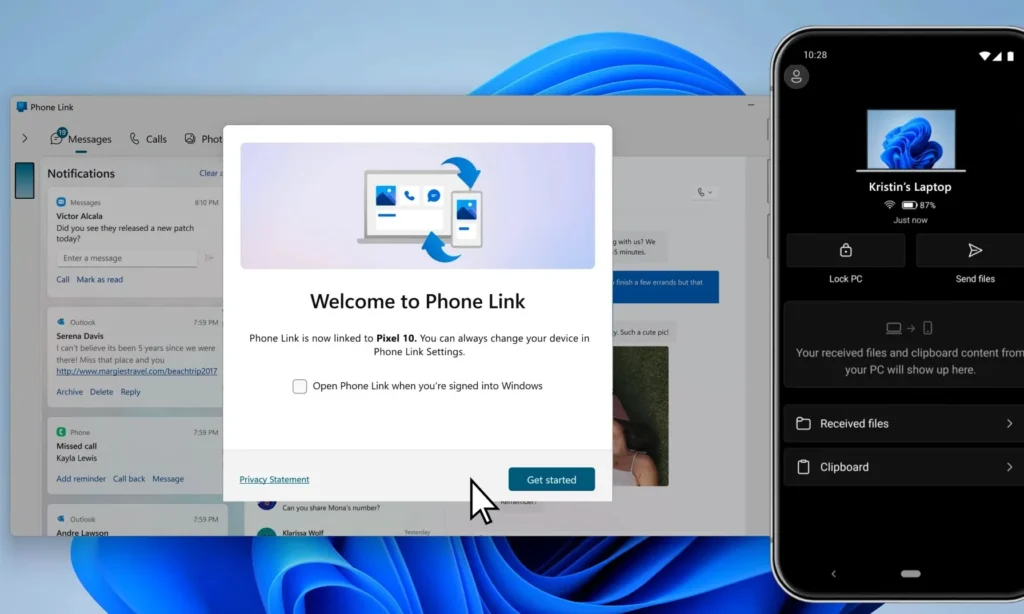
Microsoft is working to bridge the gap between Windows 11 and Android with a new feature that is both simple and obvious: the ability to control a PC’s power settings directly from a smartphone. Options found in the latest version of Link to Windows suggest that users may soon be able to shut down, restart, or put their computer to sleep remotely. They could even install pending updates before powering down.
The feature is not yet publicly available, and Microsoft has not confirmed any timeline for its release. However, it perfectly illustrates the evolution of the Connected Mobile experience: moving beyond a simple notification hub to becoming a true remote control for PCs.
Smartphones may soon be able to shut down Windows 11 PCs remotely
This new capability was discovered in a version of the Link to Windows app for Android dated August 25. The commands are currently disabled, but their presence indicates that Microsoft is developing several remote actions.
Users could potentially shut down their PC, restart it, put it to sleep, or even install pending Windows updates before shutting down or restarting.
The rationale is straightforward: all commands currently available from the Windows power menu could eventually be accessible from the linked smartphone.
A particularly useful feature for when you’ve left home
The most obvious use case may seem trivial. You leave your home or office only to realize hours later that your computer is still on. Currently, unless you have configured remote access software or a dedicated solution, there is no particularly easy way to shut it down.
With Link to Windows, it could take just seconds.
The phone then acts as a true extension of the PC, managing its state even when the user is not in front of the screen.
Connected Mobile typically operates in the other direction
Until now, Microsoft has primarily focused on integrating smartphones into Windows. Connected Mobile already allows PC users to receive calls, texts, notifications, photos, and some files from their Android device. On compatible devices, it’s even possible to launch mobile applications or interact more deeply with smartphone content.
The new power commands reverse this logic. It’s no longer just the PC that controls or accesses the phone; the phone is beginning to manage Windows as well.
Remote restart could prove very useful
The ability to restart the computer may seem simple, but it could be particularly beneficial for users who manage their machines remotely. A PC might need to be restarted after an update, a system change, or simply after several days of operation.
From a phone, users could initiate this process without having to fully log in remotely. This significantly reduces the friction for an action that typically requires no complex interaction.
Pending Windows updates could be installed in the process
Microsoft is also testing variations that would install pending updates before shutting down or restarting. This may be one of the smartest features. A user who realizes their computer has been left on could choose to take advantage of the moment to apply an update.
Instead of finding the next day that the machine still requires a restart, Windows could complete its maintenance cycle while no one is using it. Thus, the function transforms a simple shut-down command into a small administrative tool.
Microsoft plans confirmations before sensitive commands
Controlling a PC’s power remotely introduces certain risks. A shutdown or restart could result in unsaved work being lost. Microsoft seems to be anticipating this by including confirmation messages before certain actions.
This is crucial. A smartphone is often handled quickly, sometimes in a pocket or with one hand. An accidental command should not be enough to disrupt a work session.
The confirmation step adds another layer, but it seems essential for this type of function.
Sleep mode has its own limitations
The sleep command is also interesting but comes with an obvious consequence. Once the computer enters sleep mode, its connection with Link to Windows may be interrupted. This means the phone may not be able to wake the machine up later unless Microsoft adds a specific function relying on Wake-on-LAN or a similar technology.
For now, there is no indication that remote wake-up is part of this development. Therefore, sleep mode should be used with the understanding that it may temporarily break the connection with the smartphone.
Security will be a critical aspect
Allowing a phone to shut down a computer also necessitates a careful security setup between the two devices. Connected Mobile already employs an authenticated pairing between the smartphone and Windows. Power commands will likely need to utilize this same level of trust.
Microsoft must especially ensure that a computer cannot receive commands from an improperly associated device or from a compromised session. Shutting down a PC is not as sensitive as transferring passwords, but it is still a significant system action.
Windows and Android are gradually merging into a single environment
This feature is part of a much broader strategy. For several years, Microsoft has been working to blur the lines between Windows and Android. The phone is now more visible within the Start menu.
Some information about battery status and connection can be viewed directly from Windows, file transfers are becoming easier, and clipboard sharing and other cross-device functions are gradually being enhanced. The goal is to eliminate the perception that the smartphone and PC are entirely separate environments.
This strategy also addresses a historical advantage of the Apple ecosystem. An iPhone, Mac, Apple Watch, and iPad communicate seamlessly due to Apple’s control over the entire hardware and software.
Microsoft does not possess the same level of control over Android. The market is fragmented among Samsung, Google, Xiaomi, Motorola, and numerous other manufacturers. Connected Mobile serves as a common layer allowing Windows to create a relatively uniform cross-device experience.
Android is becoming almost a second interface for Windows
As functions accumulate, the smartphone assumes a different role. It is no longer just a device from which Windows displays notifications. It is becoming a remote interface for checking the PC’s status, accessing certain files, sharing content, and, possibly soon, managing its power settings. In the long run, Microsoft could push further by granting access to more system commands through Link to Windows.
Today, Microsoft is adding a significant amount of artificial intelligence to Windows. However, a simple option like “turn off my PC from my phone” can sometimes have a greater impact on daily life. It serves as a valuable reminder: not every major improvement in an operating system needs to be revolutionary.
Some simply eliminate frustrations that users have faced for years.
Microsoft has yet to make any official announcements
It is important to note a crucial detail. The commands were discovered in the code of a recent version of Link to Windows, but they remain disabled. Microsoft has not publicly announced their rollout. They may appear in a future beta, be modified, or potentially disappear before a widespread deployment.
As is often the case with features found in development builds, their existence does not guarantee commercialization.
Deployment may depend on security and reliability testing
This type of feature likely requires more validation than a simple interface change. Microsoft must ensure that the commands work correctly in various network scenarios. The PC may be on a different Wi-Fi network, the smartphone may be using 5G, Windows may have pending updates, or documents may be open. All these scenarios need to be handled properly.
The visible simplicity on the user side masks a relatively complex infrastructure.
Microsoft may not revolutionize Windows 11 with this feature. However, it encapsulates the overall direction of the ecosystem perfectly. The best computer is not necessarily the one controlled solely with a keyboard and mouse when sitting in front of it. It must remain accessible from other devices that are already being carried around. And no device is as accessible as a smartphone.



