

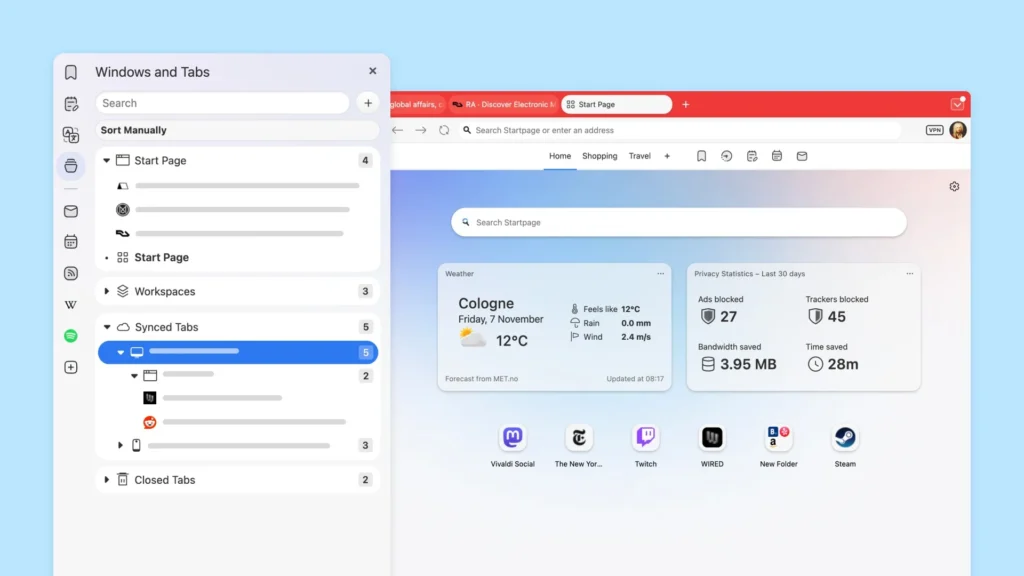
Vivaldi 7.7: Intelligent and comprehensive tab synchronization
Vivaldi continues to forge its own path in a market where browsers like Chrome, Edge, and Firefox are simplifying their interfaces to the point of becoming restrictive. In contrast, Vivaldi embraces a different approach: more control, more freedom, and an array of tools tailored to each user’s needs.
Version 7.7 of Vivaldi, now available on Windows, macOS, and Linux, perfectly exemplifies this philosophy.
Vivaldi 7.7: Tab Synchronization Becomes Significantly More Intelligent
The standout feature of this update is the enhanced tab and window synchronization. Previously, switching computers required locating your tabs one by one. Now, Vivaldi can fully reconstruct your workspace, as if you never left your primary machine.

The team explains that windows are retrieved with their complete structure intact, tab stacks remain unchanged, and the organization of Workspaces is meticulously preserved.
This synchronization goes beyond simply listing tabs; it reconstructs your environment—a level of functionality that even Firefox and Chrome have yet to achieve.
A More Flexible and Dynamic Start Page

The homepage has also evolved. Vivaldi merges its Speed Dials—rooted in the spirit of Opera—with its widgets to create a new, more comprehensive “Start Page.” Users can install their favorite shortcuts, a to-do list, weather updates, bookmarks, or various information panels.
And, as always with Vivaldi, nothing is mandatory: you can completely ignore this page and opt for a blank tab or your favorite site. This is the essence of Vivaldi: total customization without any impositions.
Increased Control Over Performance

The update also introduces a new “Performance” section in the settings, offering an Eco mode to reduce consumption, or conversely, options to allocate more resources to the browser for enhanced speed. This is a convenient way to tailor Vivaldi for either a lightweight machine or a more powerful PC.
Mail Client and Interface Enhancements

Even the finer details have been refined. The native mail client now features a clearer layout, while the Privacy Dashboard and the About page have received subtle visual updates. While not groundbreaking, these tweaks contribute to a more cohesive overall appearance.
An Update That Reinforces Vivaldi’s Identity
In its announcement, the company is clear: most browsers are converging toward a “simplified” and locked-down experience. Vivaldi aims to remain the alternative that respects advanced users, their habits, tools, and working methods. The browser is evolving into a flexible platform capable of adapting instead of imposing limits.
Vivaldi 7.7 is now available on Windows, macOS, and Linux, while updates for the mobile versions on Android and iOS continue to roll out in parallel.



