

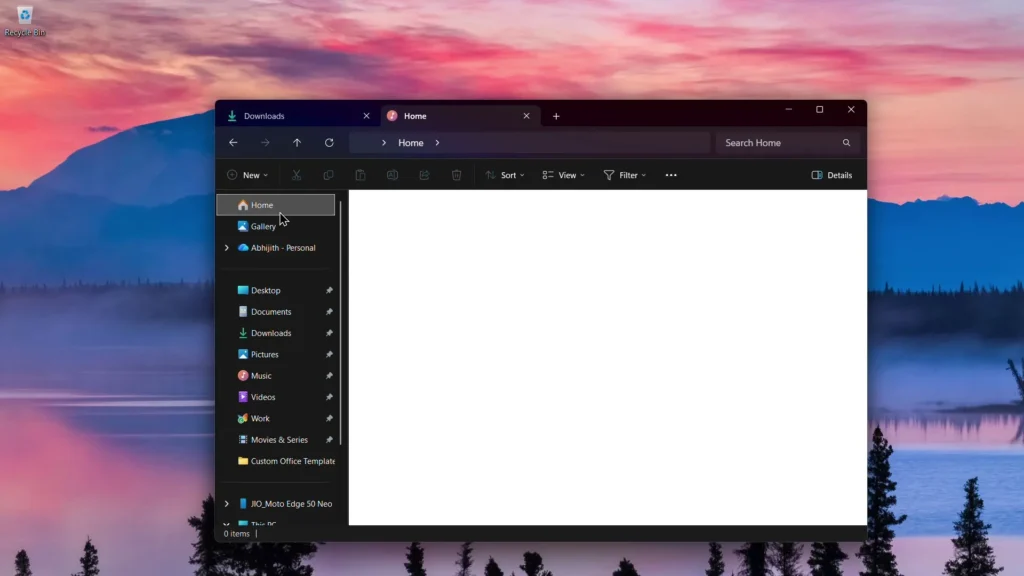
The dark mode patch for Windows 11 creates a digital flashbang
Were you hoping to finally enjoy a completely dark File Explorer in Windows 11? Well, Microsoft has just delivered an update that enhances dark mode… while introducing a tremendous white flash every time you open File Explorer. Yes, it sounds unbelievable, but it’s true.
With the KB5070311 patch, Microsoft finally addresses those outdated light mode dialogues that spoiled the dark experience — copying, moving, deleting, confirmations, progress bars… everything now transitions to dark mode.
However, instead of being a visual relief, this update causes a digital flashbang: a blinding white screen appears before loading folders.
Microsoft acknowledges the issue: “Yes, it flashes”
In their official notes: “The window may briefly display a blank white screen before loading files and folders.”
This problem occurs when you open File Explorer (especially on the Home page), switch between Home and Gallery, open a new tab, enable/disable the Details pane, or click “More details” while copying.
In short: almost anything you do within Explorer can trigger this white flash.
Good news: it’s an optional update (and you should avoid it)
This is the November 2025 Preview Update, which installs:
- Build 26,200.7309 (Windows 11 25H2)
- Build 26,100.7309 (Windows 11 24H2)
Since it’s an optional update, you can — and should — skip it entirely until Microsoft provides a fix.
Microsoft is already working on a solution, but no further Preview updates will be released in December (due to year-end breaks), so the next possible window is either Patch Tuesday on December 9 or January 2026.
Still… it was a major and interesting update
What’s most frustrating? KB5070311 included some genuinely cool additions:
- A console mode for handheld gaming PCs: On ASUS ROG Ally & co, Windows now switches to a full-screen console-like interface through the Xbox app. Much cleaner.
- Fewer background processes: Better for performance and battery life, especially for gaming.
- The dark mode is finally consistent: At least… on paper.
Wait for the proper stable version
If you use dark mode (and you probably do), only install KB5070311 if you want to be surprised by a white flash every five minutes.
Otherwise, wait for the fix. And let’s hope that this time, Microsoft will test its updates a bit more thoroughly.



