

Microsoft Copilot: Why Its New Integrated Browser Changes Everything on Windows
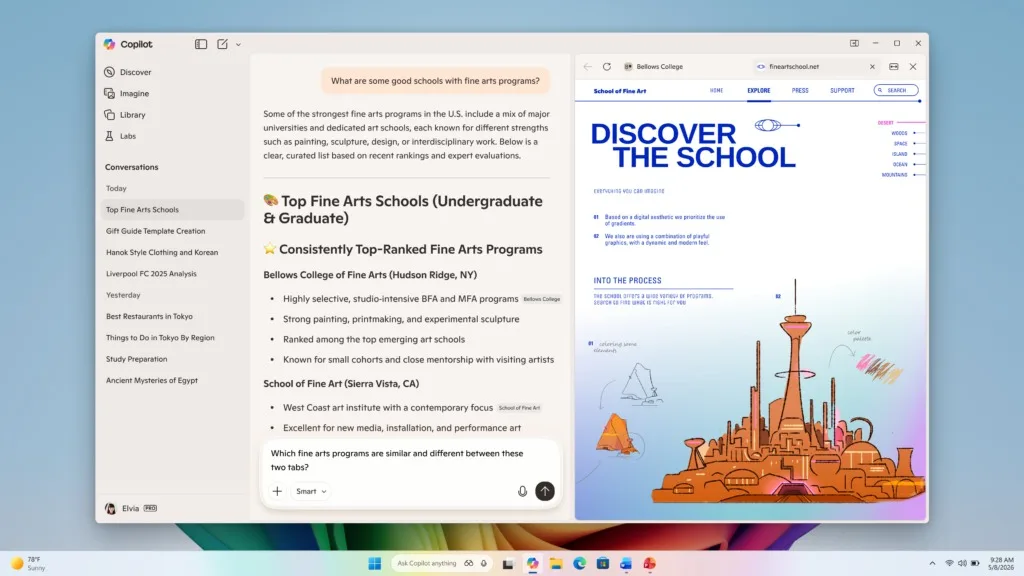
There’s a small action that disrupts a workflow more effectively than a bug: clicking a link in Copilot, getting kicked into the browser, and then losing the thread. Microsoft has just addressed this friction point with an update to the Copilot app on Windows: links now open in a sidebar alongside the conversation, acting as a mini-integrated browser.
Copilot: A Simple Change… That Changes Everything
Microsoft sums up the promise succinctly: open a link without losing context. Specifically, instead of launching a separate browser window, Copilot displays the web page to the right of the chat.
Moreover, Microsoft goes beyond mere display:
- Tabs and continuity: the open pages can remain linked to the conversation, allowing you to resume your search without starting from scratch.
- Reading context (with permission): if you allow it, Copilot can read the content of the open tabs in this panel to summarize, compare, or assist you in drafting from various sources.
The idea is clear: Copilot is no longer just a chat tool. It becomes a workspace where web navigation is part of the conversation.
A Sensitive Point: Password Synchronization
Another new feature, more delicate, is a password synchronization/autofill option to facilitate login in this integrated webview. According to several analyses, it is not “Copilot that knows your passwords,” but rather the integrated web interface’s ability to use autofill information—with explicit consent.
This is convenient… and it naturally raises a trust issue: who stores what, where, and with what guarantees. Microsoft emphasizes user control (“with your permission”), but the reception will largely depend on the clarity of the settings and the transparency of the mechanisms.
An Update: Copilot Becomes a Browser… and Edge Is Never Far Away
Many observers note that this integration relies on “Edge-like” components (WebView logic) and aligns with Microsoft’s trend of integrating the web into its product interfaces. One could view it as a productivity enhancement… or a new ecosystem lever.
Microsoft also announced performance and reliability improvements and the introduction of features already seen on Copilot.com (e.g., Podcasts, Study/Learn) in the Windows app.
Availability: Initially for Insiders
The rollout begins for Windows Insiders, gradually starting from version Copilot 146.0.3856.39 (or higher), with a gradual expansion.
This type of improvement may not make headlines like a new AI model, but it is precisely what transforms an assistant into a daily tool: reducing friction. If Copilot can keep your sources accessible in chat, link tabs to a session, and assist you in producing (summary, comparison, draft), it becomes a working interface—not just a simple prompt field.



