

Microsoft steps back on Copilot: Office’s floating button may finally disappear
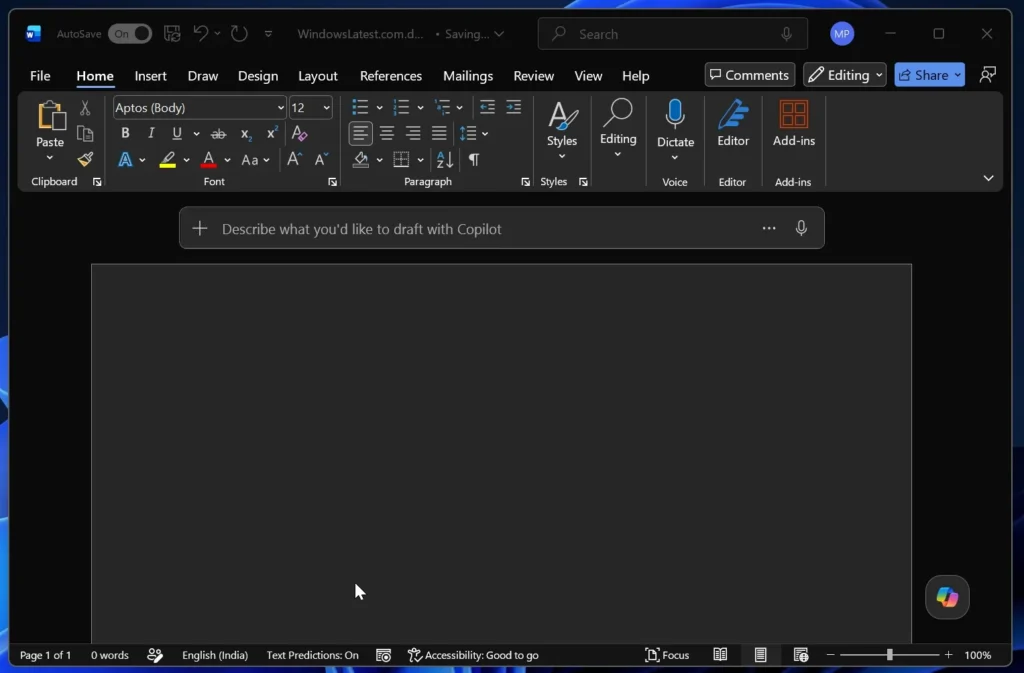
For several months, users of Word, Excel, and PowerPoint have noticed a floating Copilot button appearing in the bottom right corner of their documents. Introduced in late 2025, this shortcut imposed by Microsoft was intended to increase the visibility of AI in daily use. However, in response to criticism, the company is now reversing its decision.
Starting in the last week of May 2026, an update will allow users to move the button directly to the traditional Office ribbon.
Microsoft wanted to push Copilot at all costs
Behind this change lies a simple reality: the adoption of Copilot remains significantly below Microsoft’s expectations. According to reported figures, only about 3.3% of Microsoft 365 users currently pay for access to Copilot. To encourage usage, Microsoft had implemented what it calls the Copilot Dynamic Action Button (DAB), a floating button designed to spur more interactions with AI.
On paper, the idea seemed sound: increased visibility would lead to more clicks. In practice, however, many users perceived it as an unwelcome intrusion into their workspace.
Excel sparked frustration
Criticism was particularly intense regarding Excel. The floating button sometimes overlapped cells and data, making it difficult to read spreadsheets without a clear way to hide it.
This issue highlights a broader problem in the current strategy of tech giants: integrating AI everywhere does not automatically ensure a better user experience.
For several years, Microsoft has touted Copilot as the next significant evolution of Office. But as AI becomes more embedded in interfaces, users increasingly demand one essential thing: control over their work environment.
The button can return to the ribbon
With the new update, a simple right-click on the icon will allow users to move Copilot to the traditional ribbon. Microsoft is not completely eliminating the floating mode; users will still have the option to choose between multiple positions based on their preferences.
Katie Kivett, product manager at Microsoft, acknowledged the negative feedback and explained that the company is still working on a more sustainable approach to integrating Copilot into Office.
Microsoft begins to slow the forced integration of AI
This is not an isolated case. A few weeks earlier, Microsoft had already started removing certain integrated Copilot buttons in Windows 11 following similar criticisms.
This episode reflects a subtle but important shift in the industry: after a phase of massive AI integration into all software, companies are beginning to realize that visibility alone is not enough. An AI feature must be useful, contextual, and, importantly, discreet when not requested by the user.
In the case of Office, many users evidently prefer a classic ribbon to an omnipresent assistant.



