

iOS 27: Siri Prepares for Its Biggest AI Overhaul with Dynamic Island
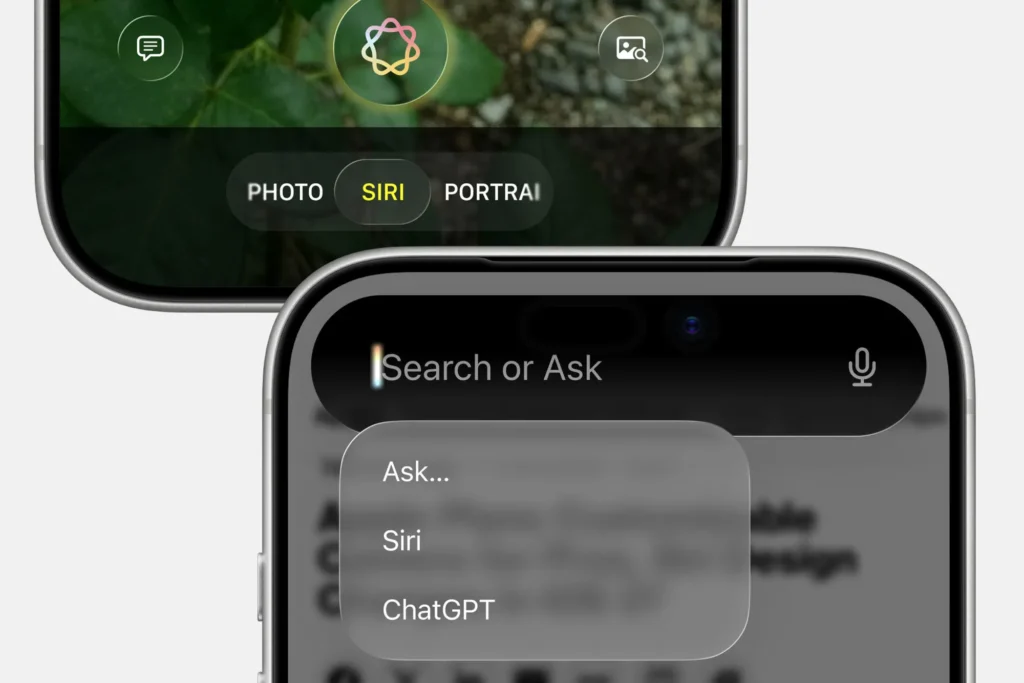
With the WWDC 2026 approaching on June 8, Apple appears to be gearing up for a significant transformation of Siri. According to renders based on reports from Bloomberg, the assistant could become a much more prominent AI agent, embedded within the Dynamic Island and accessible through a new gesture.
A Rethought Siri Around the Dynamic Island
The new Siri is designed to be an always-available assistant, with an interface emerging from the Dynamic Island. A downward swipe from the top of the screen would open a “Search or Ask” area, intended to replace the old Siri suggestions panel.
Apple is testing an approach similar to modern AI assistants: launching apps, composing messages, checking calendars, searching notes, or querying the web from a single interface.

A Real Siri App, ChatGPT Style
The redesign would also include a standalone Siri application, with text and voice input, attachments, photos, and conversation history. The interface would closely resemble that of ChatGPT or Gemini, indicating that Apple no longer wants to limit Siri to the role of a discreet voice assistant.
Users could also direct specific queries to third-party services like ChatGPT, Gemini, or Claude through a dedicated menu. This openness would be crucial to address Apple’s perceived lag behind competing AI models.
AI Becomes the New Center of Gravity for the iPhone

New features are also expected for the Camera and Photos apps, with a dedicated Siri mode and enhanced AI-powered analysis or editing tools. However, it’s important to note that these images are not official Apple visuals. They are renders based on sources, and Apple often tests several versions before the final unveiling.
If this overhaul is confirmed, iOS 27 could signify the true return of Siri in the AI race — no longer just a vocal command but a new intelligent gateway to the iPhone.



