

Google Drive integrates ransomware detection for education
In educational institutions, security is no longer reliant solely on firewalls; it is embedded within everyday tools where assignments, administrative documents, and student projects circulate.
On January 21, 2026, Google unveiled a series of updates for Google Workspace for Education, with a guiding principle: to reduce the impact of ransomware attacks and clarify the era of AI-generated content, all without transforming schools into digital fortresses.
Education: An Ideal Target and Strategic Ground
Ransomware thrives in organizations where time is short, IT is under pressure, and data holds immediate operational value. Google advocates for a simple reflex: prevent the attack from being successful, even if it has already infiltrated a device.
This philosophy underpins the new built-in protection in Google Drive for desktop: limiting contagion, preventing the overwriting of clean versions, and facilitating recovery.
Google Drive Anti-Ransomware: Automatic Synchronization Pause and Mass Restoration
The most concrete and potentially lifesaving feature is called Ransomware Detection and File Restoration.
- Google Drive desktop detection: If the system identifies typical ransomware activity (mass encryption/corruption), synchronization is automatically paused to cut off access to the cloud. The aim is to prevent encrypted (and unusable) files from replacing clean versions stored in Drive.
- Alerts for admins and users: Notifications are sent to the user’s device and reported in the administration console (Security Center), with alerts going to both parties.
- Multi-file restoration: Users can restore multiple files to a “pre-infection” state, turning Google Drive into a sort of post-attack save point.
In terms of availability, Google clearly positions this “alert and pause” layer as an automated protection feature for education plans and most commercial Workspace plans, while regular users primarily benefit from the restoration feature, without the same automatic intervention.
Verify AI Instead of Guessing: SynthID Comes “Hand in Hand” with Gemini
The second focus is on trust in content. Google is deploying SynthID verification within the Gemini app: you can drag an image or video into it and simply ask, “Is this generated by AI?” Gemini then looks for an invisible SynthID watermark and lets you know if it detects one (and, for videos, which segments).
An important nuance: currently, it mainly identifies content created/edited using Google’s AI tools. Google aims to gradually expand this capability to audio and non-Google models.
Google Meet Segmentation: Fine Control Over Live Streams with Adaptive Mode
In Google Meet, Google is adding access controls for live broadcasts: hosts can allow external guests (by invitation) and, most importantly, restrict broadcasts to specific users or groups instead of making them available to the entire domain. This is implemented through an opt-in setting: the new “Adaptive” meeting type.
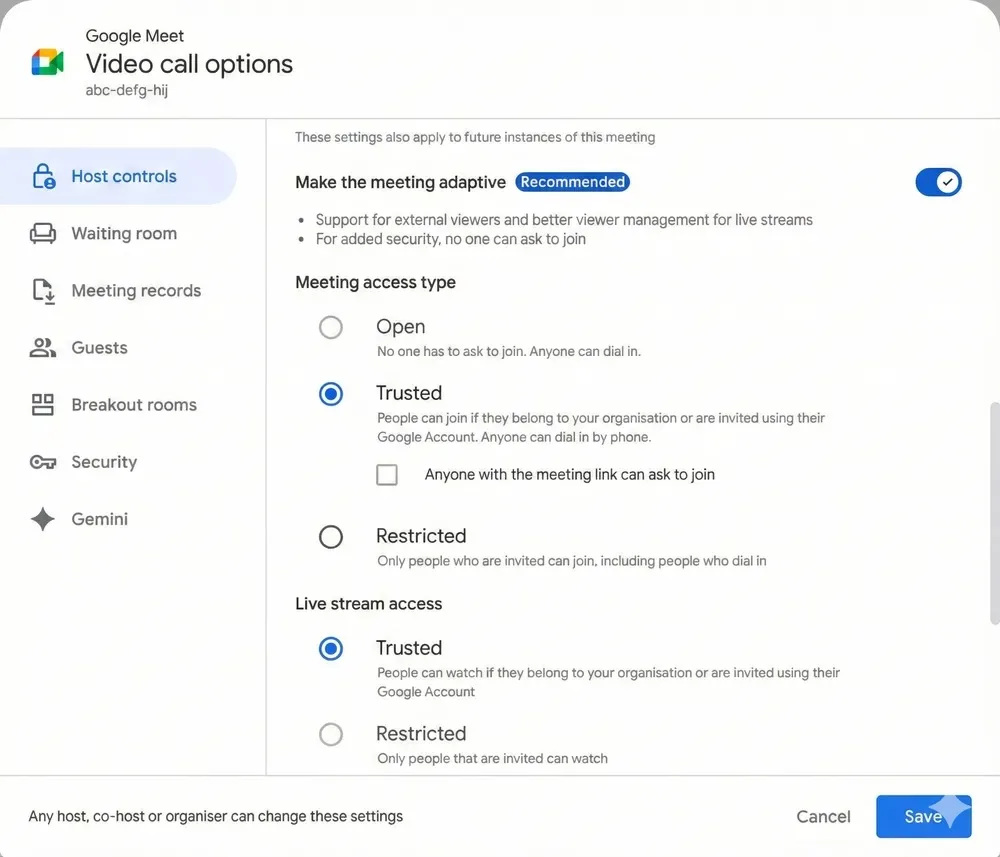
According to Google Workspace Updates, deployment began in December 2025 (Rapid Release) with Scheduled Release availability starting January 12, 2026.
Google is Selling Continuity of Trust, Not Just Tools
Taken together, these updates signal a shift in posture: Google Workspace for Education is no longer just looking to be the most convenient ecosystem but rather the most resilient one.
A fundamental question remains: automation is a powerful resource, but it can also lead to dependency. If it remains limited to certain plans, the security gap between well-funded institutions and more modest setups could widen.



