

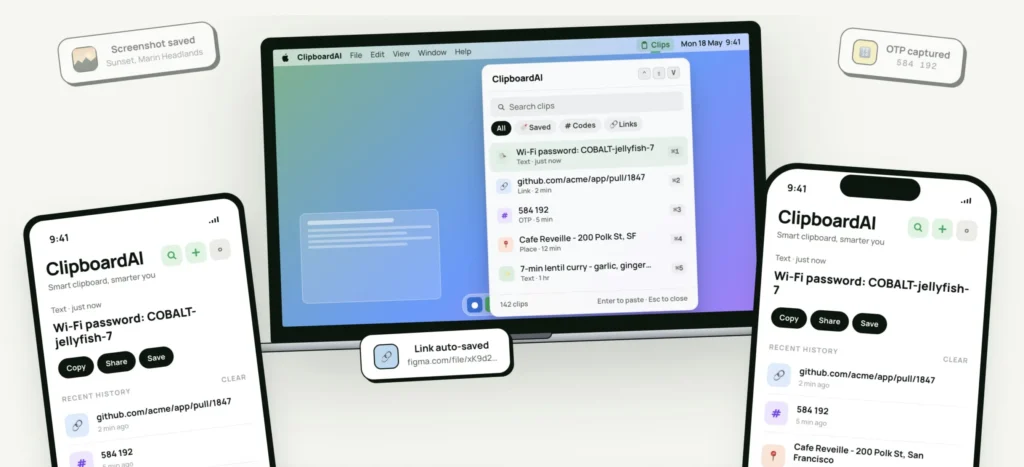
ClipboardAI transforms the clipboard of the iPhone with intelligent history and local AI
Copying a text, then copying another, only to realize that the first has disappeared: this is a frustration that most iPhone users know all too well. ClipboardAI aims to solve this problem by replacing Apple’s traditional clipboard with a smart history, enhanced by artificial intelligence and designed with privacy as a priority.
A Clipboard That Remembers Everything
By default, iOS retains only one item in its clipboard. Each new copy automatically replaces the previous one, often forcing users to restart a search or go back to an app to retrieve lost text.
ClipboardAI takes a very different approach.
The app automatically saves copied items and organizes them in a searchable history. Links, text snippets, email addresses, phone numbers, codes, images, and postal addresses remain accessible even after multiple new copies.
The goal is simple: to make the clipboard a true workspace rather than just a temporary storage.
A Local AI to Organize and Retrieve Contents
One of the main strengths of ClipboardAI lies in its built-in artificial intelligence. All copied data is automatically classified according to its type: text, web links, images, phone numbers, addresses, emails, or codes.
Users can also create custom collections to group recurring content, whether it’s response templates, research links, travel information, or frequently used notes.
The app also offers several assistive features: automatic text summarization, web link previews, language detection, translation, conversion of lists into checklists, and resolution of calculations and unit conversions. Without revolutionizing everyday tasks, these tools prevent the need to multiply apps for simple actions.

A Particularly Handy Keyboard Extension
The most interesting feature is probably the keyboard extension. Instead of opening ClipboardAI each time an old item is needed, the keyboard can display up to twenty recently copied items directly in any input field under iOS.
Whether the user is composing a message in Messages, writing an email, chatting in Slack, or working on a document in Safari, they can immediately retrieve past content without leaving their application.
This integration makes the experience much smoother than a traditional clipboard manager.
Privacy as a Main Selling Point
Apps like this often handle particularly sensitive data: passwords, validation codes, addresses, bank details, or private messages.
ClipboardAI aims to reassure users on this front. All artificial intelligence functions operate locally on the device. Data is stored using SwiftData, without servers owned by the developer, no ads, no third-party SDKs, and no analytical data collection.

The app also automatically detects certain sensitive content such as passwords, API keys, credit card numbers, and social security numbers. This information is masked by default, can be automatically deleted after 60 seconds, and remains excluded from the keyboard extension unless the user explicitly chooses to change this behavior.
The syncing between devices is optional and relies solely on the user’s personal iCloud account.
A Free Version, but Advanced Features Reserved for the Pro Version
ClipboardAI is offered in a free version that includes automatic capture, search in history, intelligent categories, and up to ten saved items. The Pro version unlocks all features, including unlimited history, iCloud syncing, keyboard extension, AI functions, and custom collections.
The subscription includes a seven-day trial for the annual plan, while a lifetime license is available for $24.99.
Could Apple Integrate Such a Feature?
ClipboardAI highlights a historical limitation of iOS. While macOS has long had many clipboard management solutions, the iPhone remains limited to a single active copy even as usage has become much more intensive. With AI assistants, mobile work, and multitasking, relying solely on the last copied item seems increasingly inadequate today.
By emphasizing an entirely local AI and a privacy-focused approach, ClipboardAI also reflects a broader trend: productivity tools are now looking to enhance native functions without compromising personal data protection.
For users who juggle links, text snippets, codes, or documents daily, this evolution may quickly become indispensable.



