


Firefox Smart Window adds web search, sources, and a visual history with AI
Mozilla enhances Smart Window, its AI-assisted browsing mode in Firefox. The beta version can now fetch recent information from the web, retrieve visual representations of previously visited pages in the history, and automatically suggest tab groups.
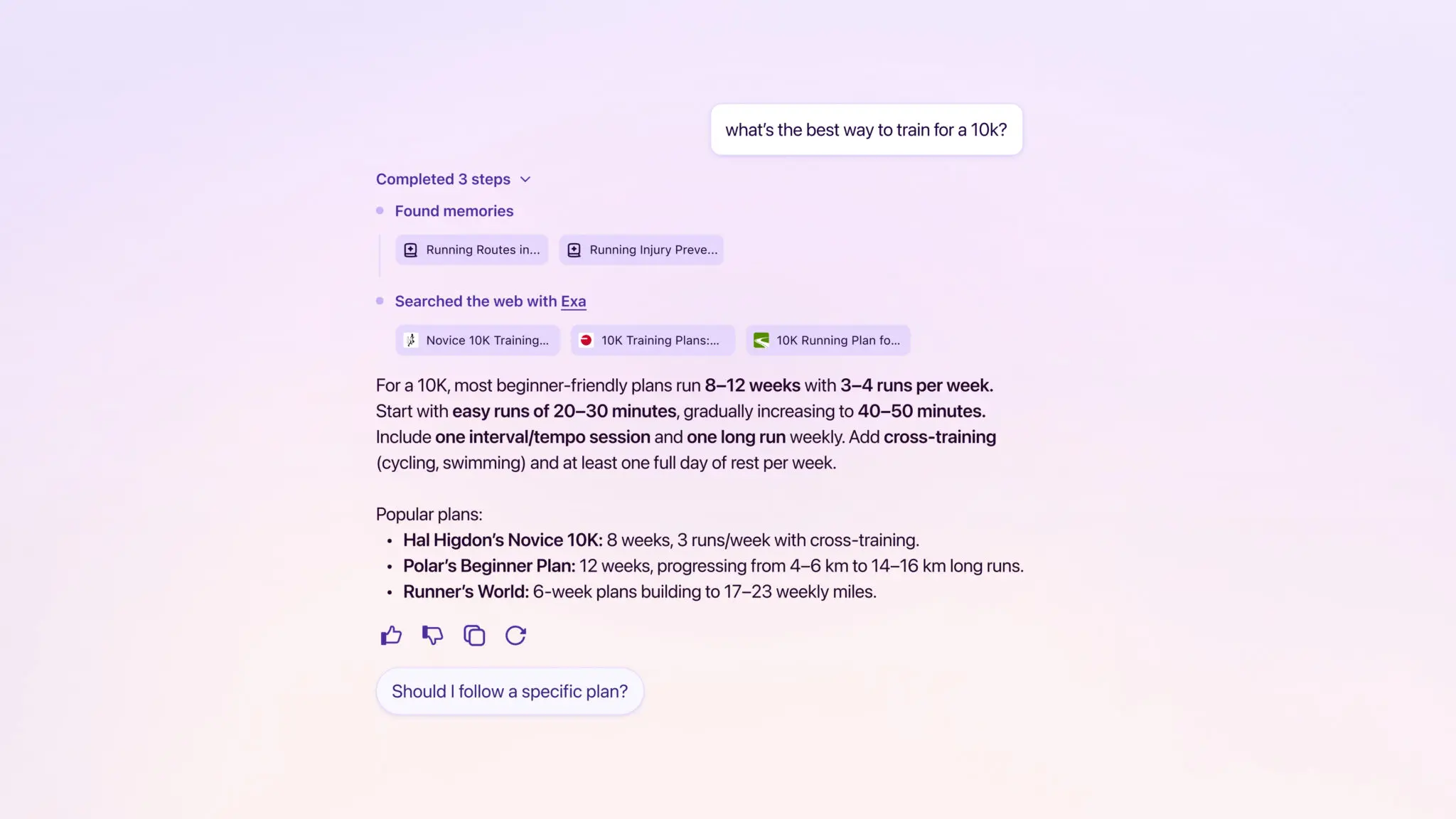
Smart Window can now search the web in real time
Initially, Smart Window focused mainly on content that was already open in Firefox: summarizing a page, comparing multiple tabs, or searching within history using natural language.
Mozilla now adds a true web search layer through a partnership with Exa. When a user asks a question in the embedded chat, Smart Window can retrieve real-time information from the internet and display links to the sources used.
This is a significant evolution: Firefox is no longer limited to working with AI on the local context of the browser. It is starting to transform Smart Window into a genuine conversational search engine while maintaining the ability to verify the origin of the answers.
The history becomes visual memory
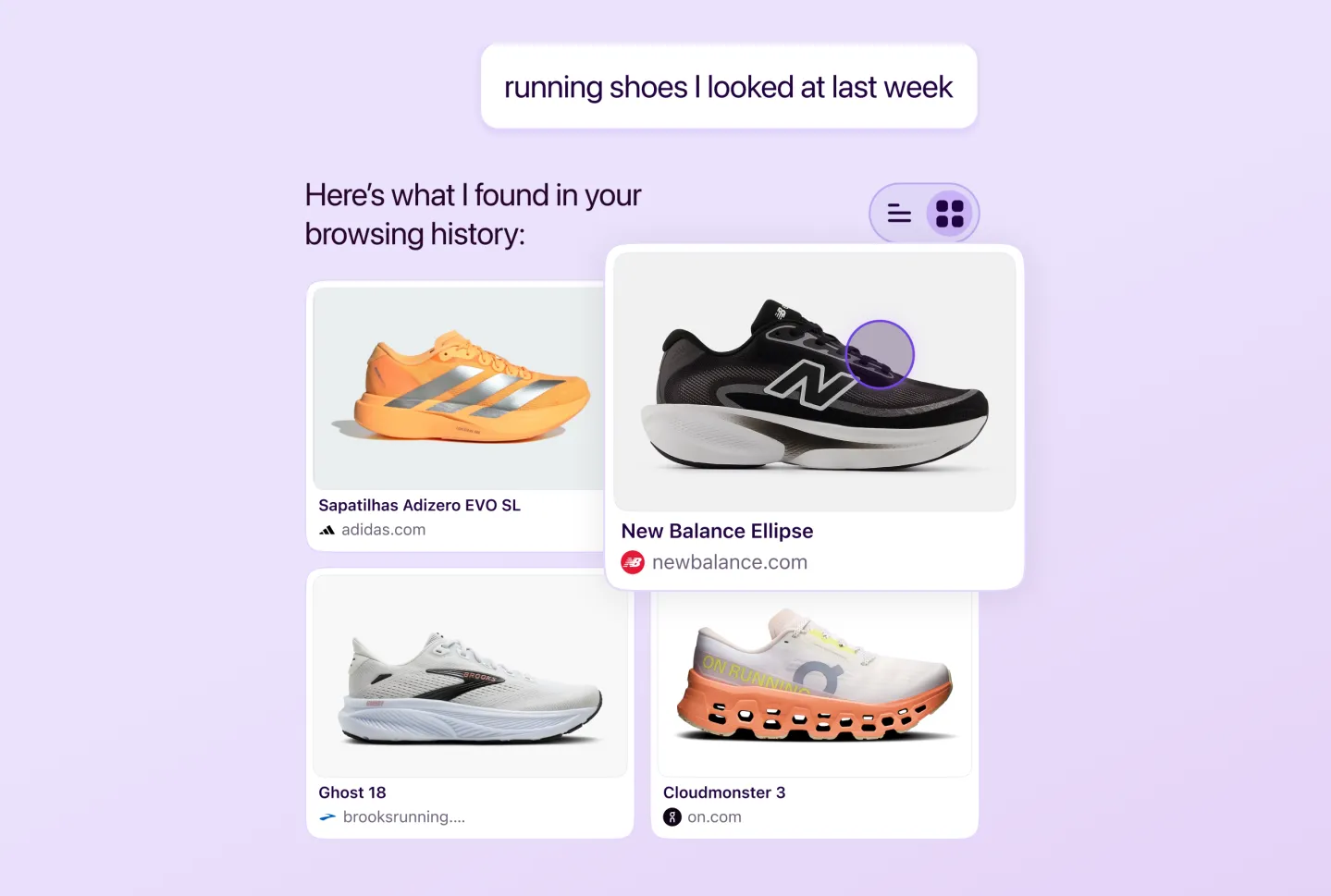
One of the most interesting new features is the ability to search through history. Smart Window already allowed natural language searches rather than requiring users to know an exact title or URL. Mozilla takes this further by adding visual previews of previously visited pages.
For example, a user could ask, “The running shoes I looked at last week,” and Firefox could sift through the relevant items in history and display the retrieved pages along with their images. This approach addresses a common problem: we often remember what we saw, but much less about the exact name of the site or page.
Finding an idea rather than a URL
This is probably where AI provides the most value. The traditional browser history relies heavily on titles, URLs, and dates. Smart Window, on the other hand, strives to reconstruct the user’s intention. Instead of searching for “nike.com/product/xxx,” users are encouraged to search for “the red sneakers I compared on Friday.”
Mozilla explains that early beta users found this approach helpful for easily resuming interrupted work and maintaining their train of thought.
Firefox also aims to automatically organize tabs
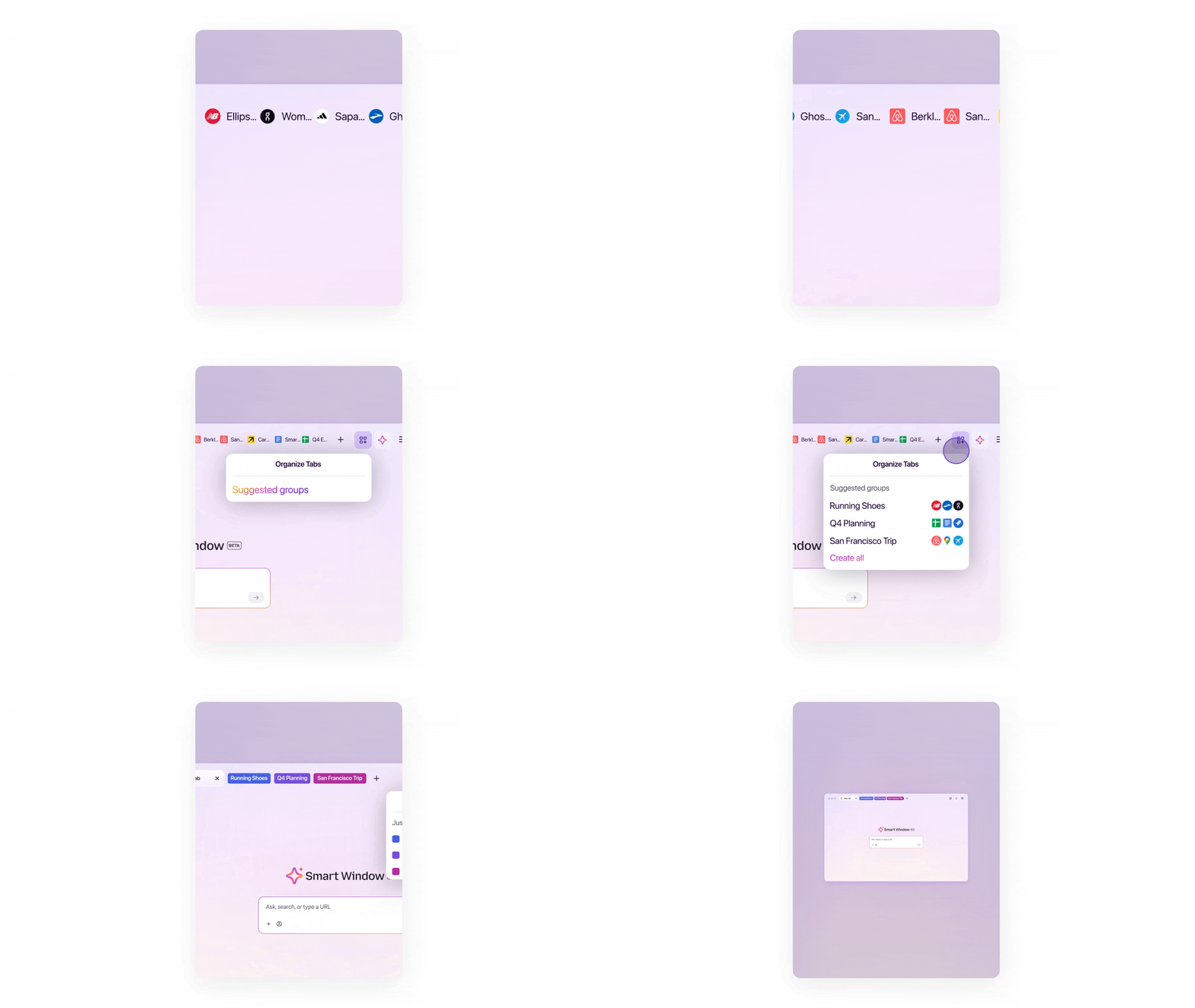
Smart Window can now suggest tab groups based on what is open. AI identifies pages related to the same subject and suggests grouping them while also spotting some duplicates. For users who accumulate several dozen tabs, this feature may quickly become more useful than just a conversational assistant.
Mozilla had already introduced local AI-based group suggestions. Smart Window now takes this logic further by integrating it directly into its assisted browsing environment.
The goal is less about generating text and more about reducing the chaos caused by navigation itself.
Mozilla wants AI to organize what you’ve already seen
This is likely what distinguishes Smart Window the most from many AI-centered browsers. Most use AI to produce new results: ask a question, perform a search, generate a summary.
Mozilla focuses more on continuity in browsing. Smart Window can understand current tabs, go back into history, display previews of already visited pages, and now enrich its responses with information from the web.
AI thus becomes a layer facilitating navigation between the past, present, and new searches rather than simply a chatbot attached to the browser.
Smart Window remains fully optional
However, Mozilla continues to present Smart Window as a feature that opts in. The mode remains in beta, and no specific timeline for its final release has been announced. This is an important choice in Firefox’s strategy.
Mozilla has added an AI Controls section to the browser’s settings this year. It allows users to disable all AI functions or individually select those they wish to keep.
The stated philosophy is thus significantly different from that of some competitors: AI should enhance Firefox for those who want it, without becoming a mandatory layer of the browser.
Multiple models available, including local options
Smart Window does not impose a single provider. Mozilla currently allows users to choose from several models, including Google’s Gemini 3.1 Flash Lite, OpenAI’s oss-gpt-120b, and Alibaba’s Qwen3-235B-A22B-Instruct-2507. Users can also opt for certain models that run locally. Mozilla presents this openness as a matter of digital sovereignty.
Individuals or organizations may prefer a local model or choose a provider established in a particular region rather than relying solely on the same American entity.
This neutrality could become one of Firefox’s main arguments against browsers directly linked to a large AI provider.
Mozilla promises no data retention with its providers
This freedom of choice is accompanied by commitments regarding data. According to Mozilla, the third-party providers used by Smart Window are bound by agreements that ensure no data retention. The prompts are processed in memory but must not be stored for model training, advertising, or general human review.
Mozilla also states it does not retain Smart Window conversations on its own servers without the explicit consent of the user.
These guarantees will be particularly important for a feature capable of working with browsing history, a type of data much more sensitive than a simple question sent to a chatbot.
Firefox aims to avoid becoming just an interface for LLMs
Mozilla’s strategy is becoming increasingly clear. The organization does not want to build a browser primarily focused on sending more questions to a language model. Rather, it seeks to leverage AI to improve tasks traditionally performed by the browser: finding a page, organizing tabs, comparing information, or resuming an interrupted session.
This is a subtle but important distinction.
In this vision, the browser remains the core product, while AI serves as a tool to use it more effectively.
Navigation “paths” and autofill features are already planned
Mozilla is already preparing for the next steps. Future versions of Smart Window are expected to better surface recent navigation paths to retrieve sets of pages viewed in the context of a specific search or project. An AI-assisted form autofill system is also on the way.
These two developments could make Smart Window much more proactive.
Instead of waiting for a user to pose a question, Firefox may gradually start to understand the structure of an ongoing task and propose suitable actions. This is precisely when the line between a browser and an assistant begins to blur.
Mozilla emphasizes chosen AI rather than imposed
Smart Window remains experimental, and its real utility will heavily depend on the quality with which it understands history and user intentions. However, Mozilla appears to have found a distinctly different positioning in the current race for AI browsers.
Instead of selecting a single model and making it the centerpiece of Firefox, the organization is betting on multiple providers, local options, granular controls, and a feature that remains switchable off.
The paradoxical bet is to integrate more AI into Firefox while providing more means to avoid using it.
If Mozilla can maintain this balance, Smart Window could transform from a browser trying to think for the user into a tool helping them find, organize, and understand what they were already doing on the web.



