

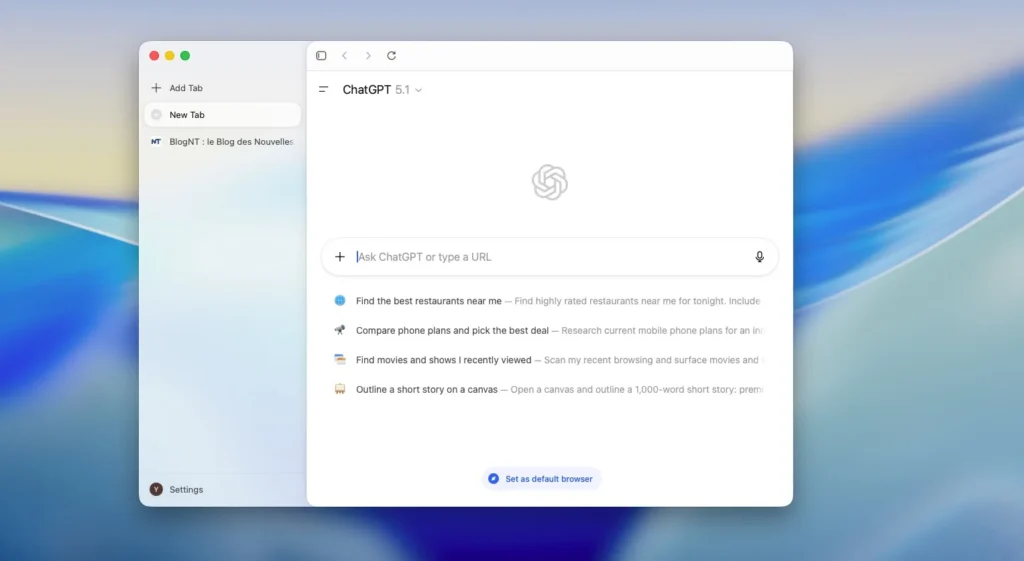
ChatGPT Atlas Add Vertical Tabs Like The Arc Browser
Just launched on macOS, ChatGPT Atlas is already evolving. OpenAI has introduced a new vertical tab interface that closely aligns its intelligent browser with the experience offered by Arc — one of the most ambitious next-generation browsers.
This update aims to streamline navigation and reduce visual clutter.
New ChatGPT Atlas release out! Just hit “update” in the top right. https://t.co/mJ6IJW0YKu
– Extensions import
– iCloud passkeys
– New downloads UI
– Setting to use control + tab to cycle to most recently used tab
– Select multiple tabs at once (shift + click)
– Ability to set… pic.twitter.com/jWoNPHcx7V— Adam Fry (@adamhfry) November 19, 2025
ChatGPT Atlas: Vertical Tabs Inspired by Arc, with a Flexible Sidebar
The most noticeable change is the introduction of vertical tabs, now accessible from a sidebar on the left. No more stacking tabs at the top: simply right-click in the address bar → Tab Style → Vertical Tabs.
Similar to Arc:
- The sidebar is resizable,
- Tabs can be reordered,
- And the overall organization becomes more visual and controllable.
The address bar remains at the top, reminding users that Atlas’s interface does not yet have the full modularity of The Browser Company’s offering — but the direction is clearly set.
Google Can Now Be Your Default Search Engine
This has been a common request: ChatGPT Atlas now allows users to set Google as the primary search engine. This decision makes sense, as using Atlas often felt like a Google search enhanced by ChatGPT, with numerous sources provided and a link to Google Search displayed in the upper right corner.
This update makes ChatGPT Atlas more of a hybrid browser — acting both as an AI engine and a gateway to the traditional web.
Navigation Enhancements: Multitabs, Extensions, and Downloads
OpenAI also seized the opportunity to roll out several ergonomic adjustments:
- Selecting and moving multiple tabs by holding Cmd or Shift,
- Automatic extension import from your current browser upon installing Atlas (a feature coming for existing users),
- A clearer management interface for downloads,
- Support for iCloud Keychain passkeys, enhancing login security.
These additions bring Atlas closer to being a fully-fledged browser while maintaining its AI-focused identity.
ChatGPT Atlas: An AI Browser Finding Its Place
Launched last month, ChatGPT Atlas is part of a wave of AI-enhanced browsers, alongside Perplexity Comet and the Gemini extension for Chrome.
Its functionality is twofold:
- Enter a URL to browse “as usual,”
- Or ask a question to get a contextual response powered by ChatGPT, along with verified sources.
With the arrival of vertical tabs and more advanced settings, OpenAI is refining its tool, striving to offer a credible alternative to traditional browsers — without sacrificing its conversational aspect.



