

Windows 11: Search Finally Becomes Effective, Here’s How!
The Windows search feature is among the most utilized yet most criticized functionalities. With overwhelming web results, irrelevant suggestions, and occasional slowness, the experience has never really met expectations. Microsoft now aims to rectify this with a significant series of enhancements designed for Windows Search.
Gradually rolled out to Windows Insider program members, this update promises a faster, clearer, and more user-friendly search experience.
A Simplified Interface For Quicker Results
The first visible change is the streamlined layout of the search homepage. Microsoft is simplifying the interface to better highlight recent searches while reducing unnecessary visual elements.
Results now clearly indicate their nature with distinct labels, making it immediately obvious if the result pertains to:
- An application
- A file
- A Windows setting
- A web result
- A suggestion from the Microsoft Store.

This distinction enables users to know where the element will open before even clicking on it, thereby improving overall readability.
Local Results Take Priority Over Web Results

Microsoft addresses a common criticism: the excessive focus on online searches. With this update, local applications, files, and settings will now be prioritized when they match user queries better. Suggestions from the Microsoft Store or search engine will only appear in the background when local results are deemed less relevant.
Another appreciated change is the removal of promotional content from web results, allowing more room for genuinely useful information.

Moreover, system elements like “This PC” or the Recycling Bin become easier to find directly from the search bar.
A Smarter Search, Even with Typos
Microsoft also enhances the search algorithm itself. Windows is now more forgiving of typos, missing or additional letters, and incomplete searches. For example, a query like “utlook” will still help locate Outlook without requiring perfect spelling.

File search also benefits from several optimizations.
Among the new features are support for queries consisting of just two characters and improved retrieval of local, cloud, or synchronized files when they are the most relevant results.
Microsoft also mentions it has begun reviewing the ranking of results related to system settings to display the settings most likely to match user requests more quickly. Further adjustments are already planned for the coming months.
More Control Over Displayed Results
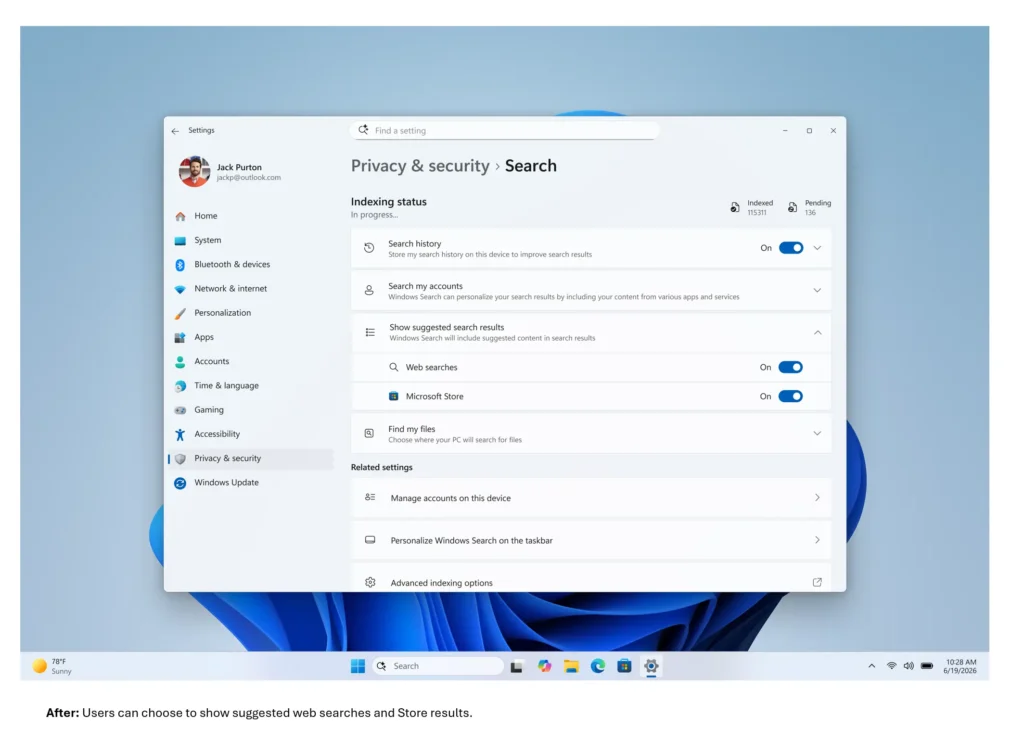
The company introduces a much-anticipated feature for users wishing to limit external results. In Settings > Privacy and security > Search, users can now choose whether web and Microsoft Store suggestions should appear alongside local results.

This option offers greater customization and allows Windows Search to function primarily as a search engine centered on content present on the computer.
A More Stable Search
Beyond the visible changes, Microsoft claims to have improved the reliability of the service. The company states it has reduced the risks of crashes, freezes, and loading issues that could affect Windows Search, while also noting that further optimizations are still in the works.
Gradual Rollout
This new search experience is currently being progressively distributed to users enrolled in the Experimental channel of the Windows Insider program via a Controlled Feature Rollout.
Thus, not all testers will receive these updates immediately. Microsoft notes that restarting the PC may sometimes trigger their activation, and advanced users can also enable them manually through feature flags.
This evolution highlights Microsoft’s commitment to making Windows 11 more coherent in daily use. Following several adjustments to the Start menu and File Explorer, it is now the system search that finally receives the long-awaited overhaul.



