

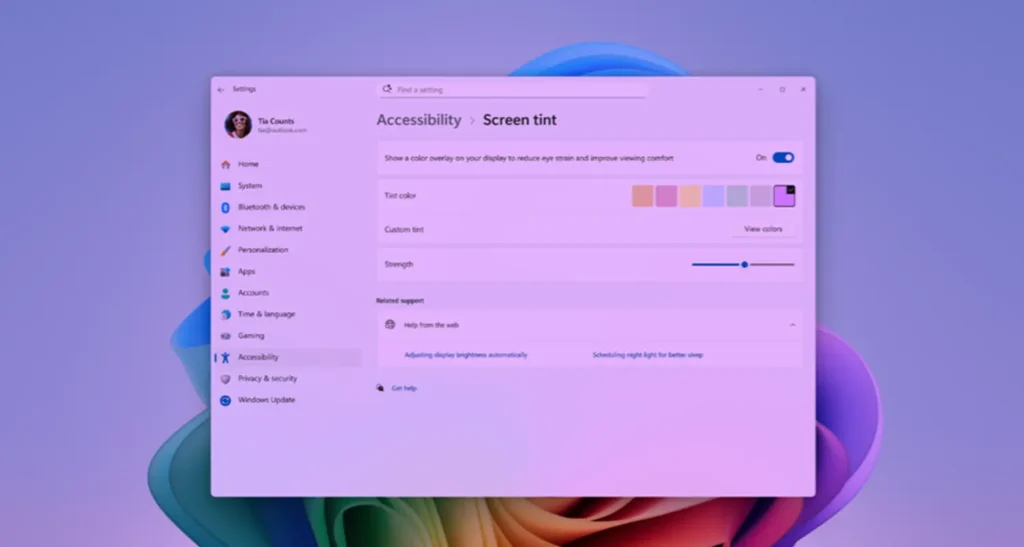
Windows 11 tests ‘Screen Tint’: A new accessibility feature designed to reduce eye strain
Microsoft continues to enhance Windows 11 with new accessibility features. The latest addition, called Screen Tint, may not revolutionize the system’s interface, but it could quickly become essential for users who spend long hours in front of their screens.
More than just a simple blue light filter, this new feature introduces a customizable color overlay intended to reduce eye strain.
A More Flexible Alternative to Night Light
Available in the latest Insider Preview build 29617.1000, Screen Tint allows users to apply a uniform hue across the entire screen without altering the color temperature, unlike the Night Light mode.
The goal is different: instead of solely reducing blue light in the evening, Screen Tint softens the display visually with a customizable colored layer. Users can choose from six predefined colors or create their own hue while adjusting its intensity through a dedicated slider.
This feature is accessible via: Settings > Accessibility > Vision.
Microsoft notes that Screen Tint specifically targets individuals who experience light sensitivity or visual fatigue caused by particularly bright screens.
A Feature Compatible with Night Light
One of the most interesting aspects is that Screen Tint can function simultaneously with Night Light.
Both tools serve different needs:
- Night Light reduces blue light emissions to enhance visual comfort in the evening.
- Screen Tint applies a soft hue that lessens glare, regardless of the time of day.
This combination could appeal to users working on documents with a white background, content creators, or gamers engaged in long sessions in front of their screens.
However, Microsoft indicates that enabling Screen Tint will automatically disable any existing color filters in Windows. Users relying on these accessibility tools will need to choose between the two solutions.
A Small Update That Could Appeal to a Wide Audience
At first glance, Screen Tint may seem insignificant. Yet, this type of feature addresses an increasingly common issue: the time spent in front of screens. With remote work, days spent on multiple monitors, video editing sessions, or lengthy gaming marathons, visual fatigue has become a daily concern for many users.
The ability to apply a slight warm, gray, or pastel tint without completely altering colors could enhance user comfort while reducing the harsh visual impact generated by overly bright interfaces.
More Improvements Coming to Windows 11
This new Insider build doesn’t stop at Screen Tint. Microsoft is also continuing to develop several system features, including better Bluetooth device recovery after disconnections, multiple enhancements to Recall, and various stability and performance optimizations.
While these developments may be subtle, they reflect Microsoft’s commitment to gradually refining the Windows 11 experience beyond the major innovations tied to artificial intelligence.
An Approach that Prioritizes User Comfort
In recent years, Microsoft has primarily focused on Copilot and AI features integrated into Windows. With Screen Tint, the company is taking a different approach by focusing on the everyday comfort of users.
Such improvements may not attract attention during official announcements, but they often represent the features we ultimately use every day. If feedback from Insider program members is positive, Screen Tint could quickly become an essential feature of Windows 11 for professionals, content creators, and anyone spending several hours a day in front of a screen.



