

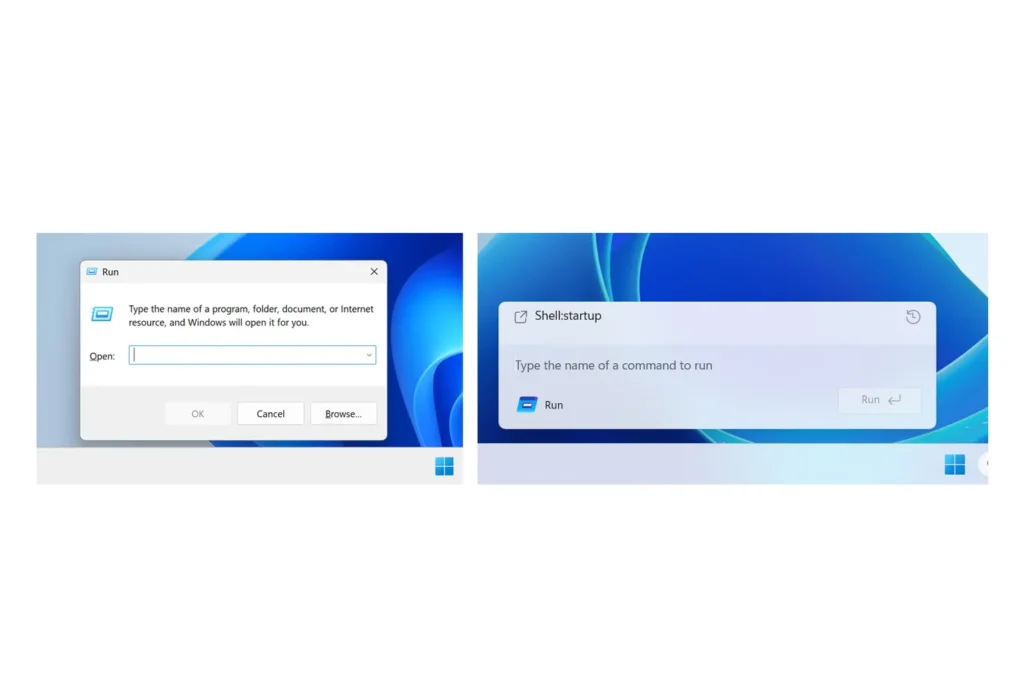
Windows 11 modernizes the Run menu with dark mode and faster interface
Microsoft is taking on one of the oldest remnants of Windows. The Run menu, unchanged in spirit for decades, is finally testing a modernized interface on Windows 11, featuring a dark mode, a more cohesive design, and a faster loading experience.
Windows 11: A Small Menu, but a Strong Symbol
Available for Windows Insider members in the new Experimental Channel, this revamped Run menu embraces an aesthetic more in line with Windows 11.
Microsoft has also removed the Browse button, deemed underused, and replaced it with a ~ command that allows direct access to the user folder.
This redesign is based on code from Command Palette, a PowerToys tool designed for quickly launching commands, websites, or file searches. The new menu can be activated from Settings > System > Advanced.
Microsoft Finally Polishes the Details of Windows
This change may seem minor, but it reflects a broader evolution: Microsoft aims to erase the visual inconsistencies inherited from previous versions of Windows. The dark mode is gradually being integrated into long-forgotten dialog boxes, a symbolic effort for an OS often criticized for its lack of unity.
The central challenge remains: to maintain the speed and simplicity of the Run menu. For advanced users, this shortcut has never needed to be flashy. It should appear instantly, execute a command, and then disappear.



