

Windows 11: How Copilot Transforms File Explorer Into an AI Agent
For years, Windows search has been a handy yet frustrating little rectangle—efficient for finding a file name but much less so for answering questions posed in a “human-like” manner.
The shift that Microsoft is orchestrating is more radical than it appears: Copilot is directly integrating into the taskbar and File Explorer, using “semantic search” logic and AI-assisted actions.
Indeed, the concept aligns with what you’ve described: less digging, more intention.
The Taskbar Becomes an AI Interface, Not Just a Search Field
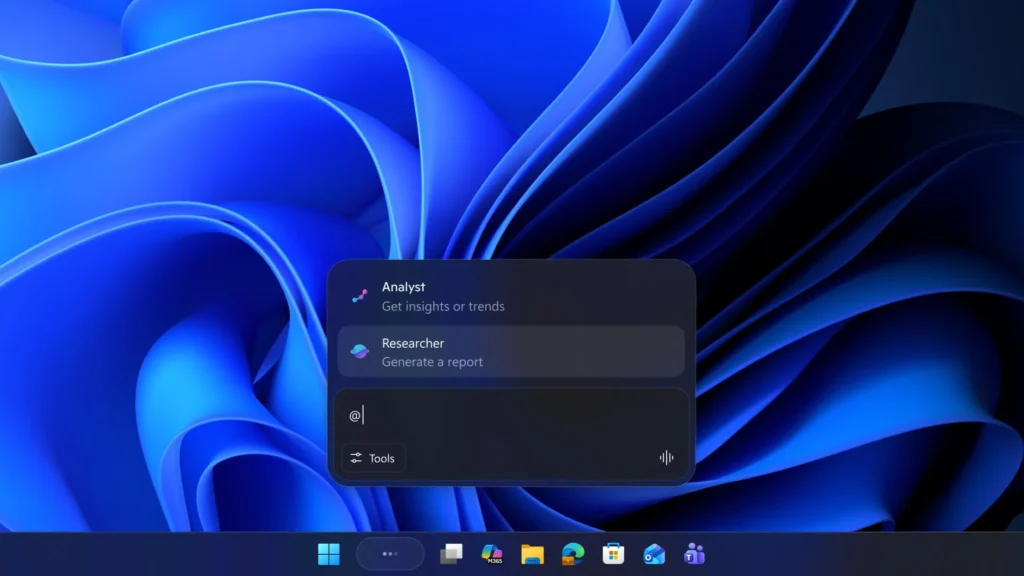
Microsoft is incorporating Copilot into the taskbar search field, transforming it into a chat feature capable of understanding natural language queries (rather than just keywords). Windows Central previously outlined this transition in 2025: the search bar is becoming a “Copilot-first” entry point, continuing the trend of AI across the operating system.
There’s also a voice shortcut on Microsoft’s side: holding the Copilot key (on compatible keyboards) or pressing Windows + C to launch Copilot Voice.

Agents via “@”: An “Agentic” OS Logic
Where it really gets interesting is the introduction of a mechanism for summonable agents using @ in the taskbar search, complete with status tracking (progress, badge, validation). This has been described in various previews and feedback: the agent works “alongside” you while you do other tasks, then returns with a summary or report.
It’s worth noting that part of this scenario (third-party agents, exact behaviors, “mission control”) depends on Insider versions and phased deployments, and it may evolve over time.
File Explorer: Copilot Without Opening the Document
Two movements overlap:
- Unifying Local and Cloud: The more integrated display of OneDrive/SharePoint within the file experience aligns with Microsoft 365’s trajectory (though this depends on Windows edition, account, and configuration).
- Interrogating a File Without Opening It: Microsoft explicitly documents scenarios where you can “Ask a question” about OneDrive/SharePoint files directly from the context (selection, menu) and receive an answer in a Copilot panel.

In other words, File Explorer will no longer serve just to navigate, but also to interrogate. This signifies a cultural shift: files become an “accessible source” via natural language rather than objects that are opened for content discovery.
What This Changes in Daily Life: Search Becomes Contextual, Not Document-Based
The benefits are clear for many “work” scenarios:
- Finding information (a number, phrase, passage) without reopening a PDF/Word file.
- Recontextualizing (“the doc that Robin shared”) based on emails, meetings, and recent files—as long as you’re within the Microsoft 365 ecosystem and have the necessary permissions.
- Reducing friction: fewer tabs, less folder exploration, more “question → answer” interactions.
With Copilot+ PC, Microsoft is also pushing local (“on-device”) functionalities that utilize the NPU, such as Fluid Dictation, which is documented as an improved dictation experience using on-device models.
The Blind Spot: Privacy and Data Governance
This is the factor that will determine adoption in enterprises. Understanding where the answer originates (and whether it cites sources) is crucial to avoid “hallucinations” or misinterpretations. Managing the data surface (local, OneDrive, SharePoint, emails, calendar) requires robust M365 policies: permissions, classification, DLP, audit. Lastly, avoiding the “super search” effect that reveals too much information to the wrong individuals is essential: while AI does not create access, it can make content extraction significantly easier.
Microsoft is steering Windows 11 towards a straightforward idea: the taskbar as a command interface, and File Explorer as a layer of understanding—not just storage. If the deployment fulfills its promises (and remains clear regarding sources and permissions), Windows is moving closer to an “agentic OS” where we search less because the system better understands our desires.
If you wish, I can rephrase this in a “paper” format (premium article style) or a shorter version for a LinkedIn post, complete with a box titled “What’s Coming on Copilot+ PC vs. Standard PC.”



