

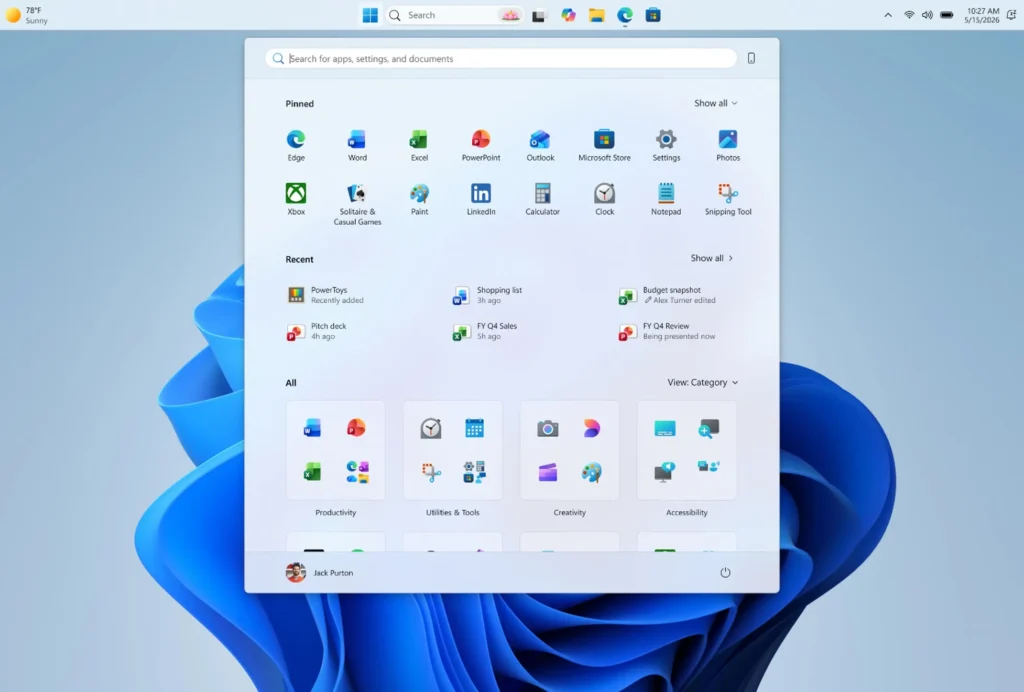
Windows 11 tests a truly customizable taskbar
Microsoft is preparing one of the most anticipated features for Windows 11: the ability to freely move the taskbar. In a new version for Insiders in the Experimental channel, the company is also testing a more flexible Start menu, signaling a subtle yet significant shift in its approach to user experience.
The Return of Lost Freedom
Since the launch of Windows 11, the fixed taskbar at the bottom of the screen has been one of the most criticized aspects by longtime Windows users. Microsoft seems to be finally addressing this issue: the new test version will allow users to position the taskbar at the bottom, top, left, or right of the screen.

This evolution goes beyond mere visual comfort; it marks a change in posture: Microsoft acknowledges that Windows must remain an adaptable system, able to follow work habits rather than impose them.
A More Modular Start Menu

The update also introduces new settings for the Start menu. Users will be able to choose to display or hide the “Pinned,” “Recommended,” and “All” sections. Microsoft also plans to rename “Recommended” to “Recent,” a clearer designation for recently installed applications and opened files.

Another useful detail is that it will be possible to hide your name and profile picture in the Start menu. This option is designed for presentations, screen sharing, or professional use where privacy is essential.
A Taskbar Designed for More Screens
Microsoft is also testing a more compact version of the taskbar, particularly relevant for laptops, Windows tablets, or devices with smaller screens. The Start menu can also be displayed in either “Small” or “Large” versions, depending on user preference.
This customization approach brings Windows 11 closer to a broader promise: to make the interface less rigid, more contextual, and better suited to various device formats.
Microsoft Aims to Regain Trust
The message here is as strategic as it is functional. By giving users control over visible elements like the taskbar and Start menu, Microsoft seeks to rebuild a sense of trust. For Windows, the interface is not just a backdrop; it’s the daily point of interaction with the PC.
This update does not revolutionize Windows 11, but it addresses a symbolic frustration. Sometimes, in a mature operating system, it’s precisely these adjustments that matter the most.



