

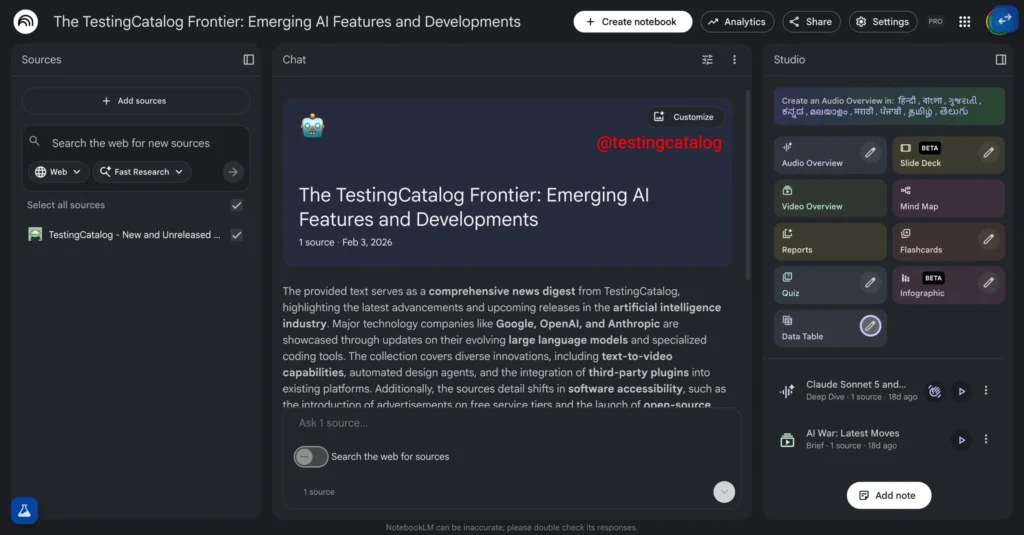
NotebookLM: Google tests customizable banners for your projects
NotebookLM is powerful, but it has long had a very human flaw: when your projects stack up, everything starts to look the same. Lists of titles, sources, and that feeling of navigating through a binder without dividers.
According to several signals picked up in testing versions, Google may be addressing this with a straightforward…yet potentially transformative feature: customizable header banners for each notebook.
NotebookLM: A Header That Gives Identity to Each Notebook
As reported by Testing Catalog, Google is testing the inclusion of a header area at the top of each notebook, where the title could sit on a banner image, with a “Customize” button on the right to modify it.
Google may soon allow users to customize their notebooks on NotebookLM with a banner image.
Do you have a notebook worth featuring? 👀 pic.twitter.com/5O1l4Xg8jx
— TestingCatalog News 🗞 (@testingcatalog) February 22, 2026
This is not merely a cosmetic feature: in a research-oriented tool (often very text-heavy), the image becomes a cognitive anchor. A “thesis” notebook, a “product roadmap” notebook, a “journal”: instead of reading, you recognize.
A Subtle Yet Valuable Detail: The Creation Date
The captures mentioned also show an enhancement of the header: the creation date of the notebook would appear under the title, alongside the number of sources. It’s the kind of metadata that often goes unnoticed… until you need to find “that project from three months ago.”
Uploaded Image or AI-Generated Image?
At this stage, there is some ambiguity: Testing Catalog talks about adding an image via the “Customize” button, but it is unclear whether Google will allow only image uploads (from device/Drive) or if NotebookLM will also offer automatic generation based on content (which would align with the “Studio” direction and experiments around visual creations).
NotebookLM Evolving Into A Personal Tool, Not Just A Useful Tool
This evolution is in line with a clear trend: AI assistants are shifting towards more sustainable uses, becoming more “library-like,” where users return, archive, and build. Google has already promoted NotebookLM as a study and content production tool (flashcards, quizzes, reports). The visual customization reinforces the idea of a workspace that belongs to you, rather than just a disposable chat.
As always with such discoveries, there’s no guarantee that the feature will go live. It has not been activated for everyone, and Google may choose to test, modify, or abandon it. However, the fact that several independent sources have noted the same direction lends weight to the hypothesis of a gradual rollout.



