

Microsoft Word: Just Paste a URL to Create a Link
Microsoft Word has introduced a small but significant enhancement that transforms an everyday task: adding hyperlinks. Now, you can simply paste a URL directly onto selected text to instantly convert it into a link.
This feature is already available in Word for the Web and is gradually rolling out to desktop versions. While it might seem like a minor change, it represents a significant productivity boost for users who spend their days writing.
Microsoft Word: A Simple Gesture, A Big Change
Previously, creating a link in Word felt almost like a ritual:
- Select the text,
- Right-click or use a keyboard shortcut,
- Open the link insertion window,
- Paste the URL,
- Confirm.
Even with the Ctrl + K/Cmd + K shortcut, this process interrupted the writing flow—especially when compared to tools like Slack, Notion, or Google Docs, where direct pasting is the norm.
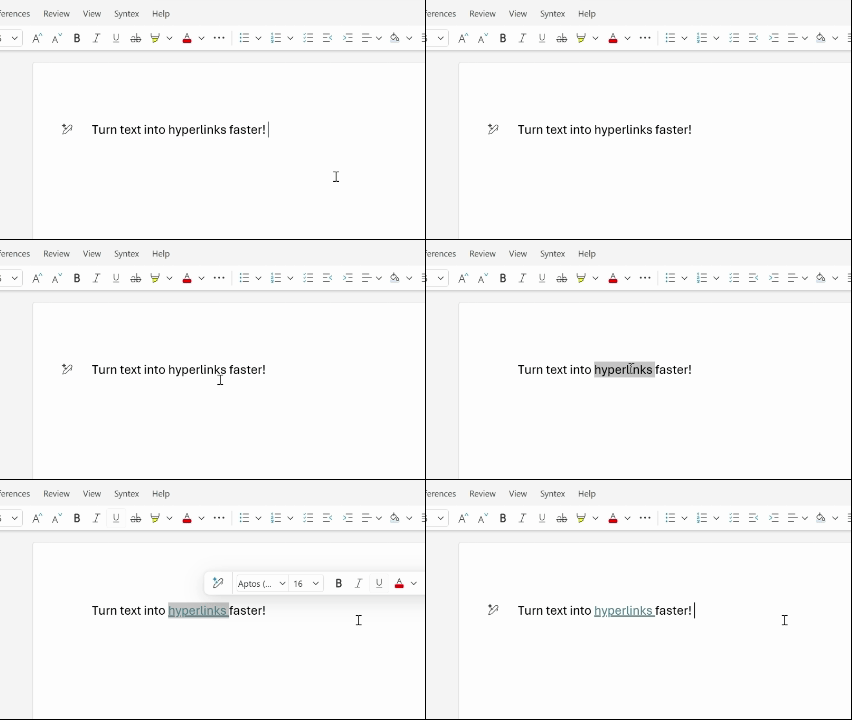
With this update, the entire process is streamlined to a single action: you copy the URL, select the text in Word, and paste it. Word automatically recognizes it as a link and applies it to the selected text, without any intermediate windows or extra clicks.
Staying in the Writing Flow
According to Jenny Ye, product manager for Word, the goal is clear: “Everyday tasks, such as adding links, should be effortless.” This new feature precisely achieves that. When writing reports, technical documents, research notes, or bibliographies, each interruption matters. Frequent navigation through menus can disrupt focus and slow down progress.
This new method allows users to stay engaged with the content, prevents pasting errors (like placing the URL next to the text or overwriting text), and saves a few seconds per link—time that quickly adds up in dense documents.
A Delay Finally Addressed
Let’s be honest: this behavior should have been the standard long ago. Many applications have adopted it for years, while Word was an unfortunate exception.
However, better late than never. This update shows that Microsoft is continuing to modernize the fundamental actions in Word, not with flashy features, but with concrete improvements that are genuinely useful.
Availability: Who Gets Access?
- Word for the Web: The feature is already active.
- Word for Windows: Version 2511 (Build 19530.20006) or later.
- Word for macOS: Version 16 104 (Build 25120915) or later.
- Members of the Microsoft 365 Insider program should already see the feature appear according to their update channel.
If you don’t see it on desktop yet, don’t worry: the rollout is gradual.
This evolution exemplifies a frequently underestimated truth: productivity gains often arise not from major revolutions, but from the removal of small frictions.
By simplifying link insertion to just a paste, Microsoft Word finally aligns itself with modern text editing standards. For heavy users, it’s a subtle yet instantly noticeable improvement—and it’s hard to imagine going back once you’ve experienced it.



