

Google Docs: Gemini Summarizes Comments and Speeds Up Collaborative Review
Collaborative documents are becoming smarter. Google enhances Google Docs with new features powered by Gemini, its generative artificial intelligence. The aim is straightforward: to help teams easily find important comments, identify unanswered discussions, and speed up the document review process.
With this development, Gemini is no longer just a text generator. The assistant is evolving into a true editorial co-pilot capable of analyzing interactions among collaborators and simplifying the review workflows.
An AI Capable of Synthesizing Dozens of Comments
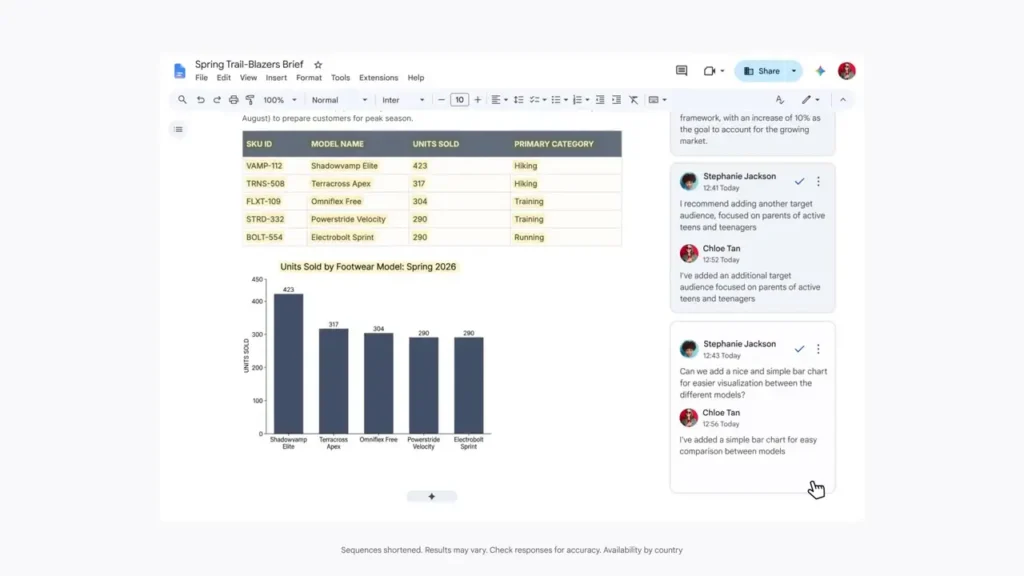
When a document is reviewed by multiple people, comment threads can quickly become overwhelming. Google is now entrusting this task to Gemini. The new feature can summarize all comments in a document, group remarks by author or theme, identify unresolved discussions, and highlight unanswered questions.
Rather than manually sifting through each comment, editors receive a summary that clearly presents the state of discussions.
Google clarifies that Gemini does not resolve debates; it simply organizes information to facilitate decision-making.
Automatically Generated Responses and Modifications
The assistant does not stop at summarization. Once comments are analyzed, Gemini can also draft a proposed response directly in a discussion thread, suggest modifications to the document based on reviewer feedback, and automatically retrieve a relevant file stored in Google Drive to add to the conversation.
The goal is to minimize back-and-forth between various tools and reduce the time spent managing feedback.
Aids in Revision, Not a Replacement for the Author
Google is also enhancing the editorial analysis capabilities of Gemini. The AI can now review an entire document and provide comments on clarity, coherence, and structural fluidity. Despite these new capabilities, Google emphasizes one critical point: no changes are applied automatically.
Every suggestion must be approved by the user before being incorporated into the document.
This approach ensures human control over content while benefiting from intelligent assistance.
A Gradual Rollout for Subscribers
The rollout of these new features began on July 28. Google states that their availability could span a period of up to 15 days. Access is reserved for users with compatible subscriptions, including Google Workspace, Google Workspace for Education, and certain Google AI subscriptions.
The intelligent features and Gemini for Workspace must also be activated.
Lastly, the assistant can only analyze comments if the user has editing rights on the document. Those with read or comment-only access will not be able to utilize these new functions.
Google Gradually Transforms Docs into an Intelligent Editorial Assistant
Through this evolution, Google continues to pursue a clear strategy: to make Gemini an integrated tool at all stages of document creation. After text generation, rephrasing, and drafting suggestions, artificial intelligence is now addressing one of the most time-consuming aspects of collaborative work: managing feedback and comments.
This new functionality illustrates a broader trend in modern office suites. AI is no longer just about content production but about streamlining interactions between collaborators and expediting validation processes. By transforming numerous scattered comments into a usable summary, Google aims to lessen the cognitive load on teams and enhance the effectiveness of collaborative projects while keeping the final decision in the hands of users.



