

Android September Drop: Gemini, Find Hub and Google Messages get five useful new features
The Android September Drop is here, with five new features across Gemini, Find Hub, and Google Messages. Unlike some updates focused on the latest Pixel or Galaxy devices, this one targets a much broader range: depending on the features, compatibility extends back to Android 9.
Google is focusing on practical uses. Find Hub can now remember where you’ve stored an item that doesn’t have a tracker, Motion Assist aims to reduce motion sickness, while Gemini Live, Google Keep, and Messages receive new integrations.
Find Hub can now remember where you stored an item
The most original feature is related to Find Hub. Google now allows you to ask Gemini to remember where you stored a physical item, even if it doesn’t have a Bluetooth tag.
For example, Google suggests using your passport. You can tell Gemini to remember it was stored in a drawer in your bedroom, with the option to add a picture. This information is then saved in a new tab dedicated to remembered items in Find Hub.
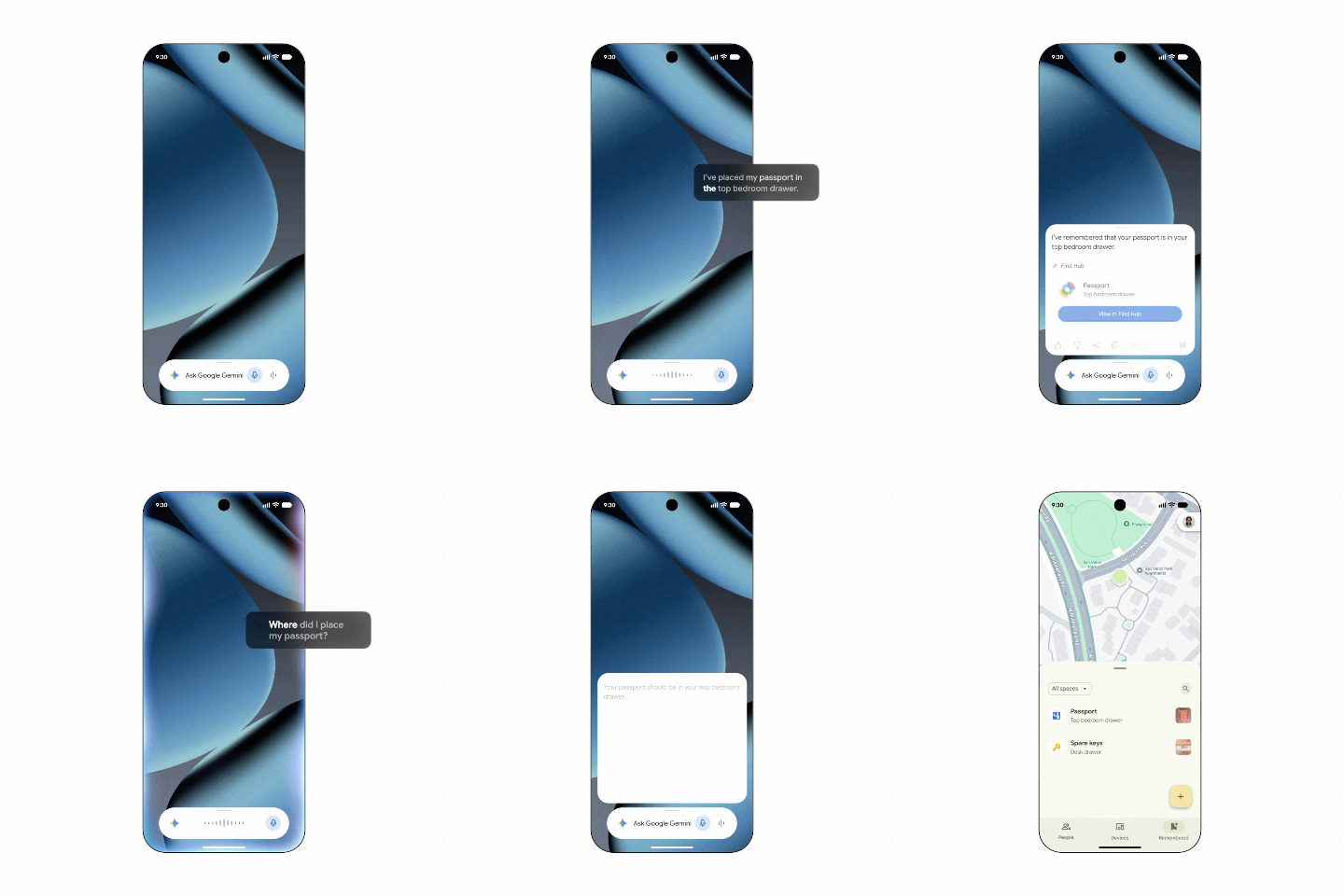
When the item is needed again weeks or months later, users can simply ask Gemini or open Find Hub to locate the stored position.
This concept is particularly relevant for items that are used infrequently, for which attaching a permanent tracker might be excessive. Administrative documents, duplicate keys, specific chargers, or travel accessories can be recorded as mere location memories.
Gemini gradually becomes an external memory for Android
This feature is interesting because it expands Gemini’s role. The assistant is no longer just used for searching information or interpreting content but also for maintaining personal context provided voluntarily by the user.
Find Hub thus approaches a true catalog of important items, whether they’re tracked in real-time by a tag or simply associated with a stored location.
The difference may seem minor, but it changes the logic of the service. Google is no longer just answering the question, “Where is this item now?” but also “Where did I decide to store it last time?”
This function requires Android 16 or later and will be available in countries where both Gemini and Find Hub are supported.
Motion Assist arrives with Android 17
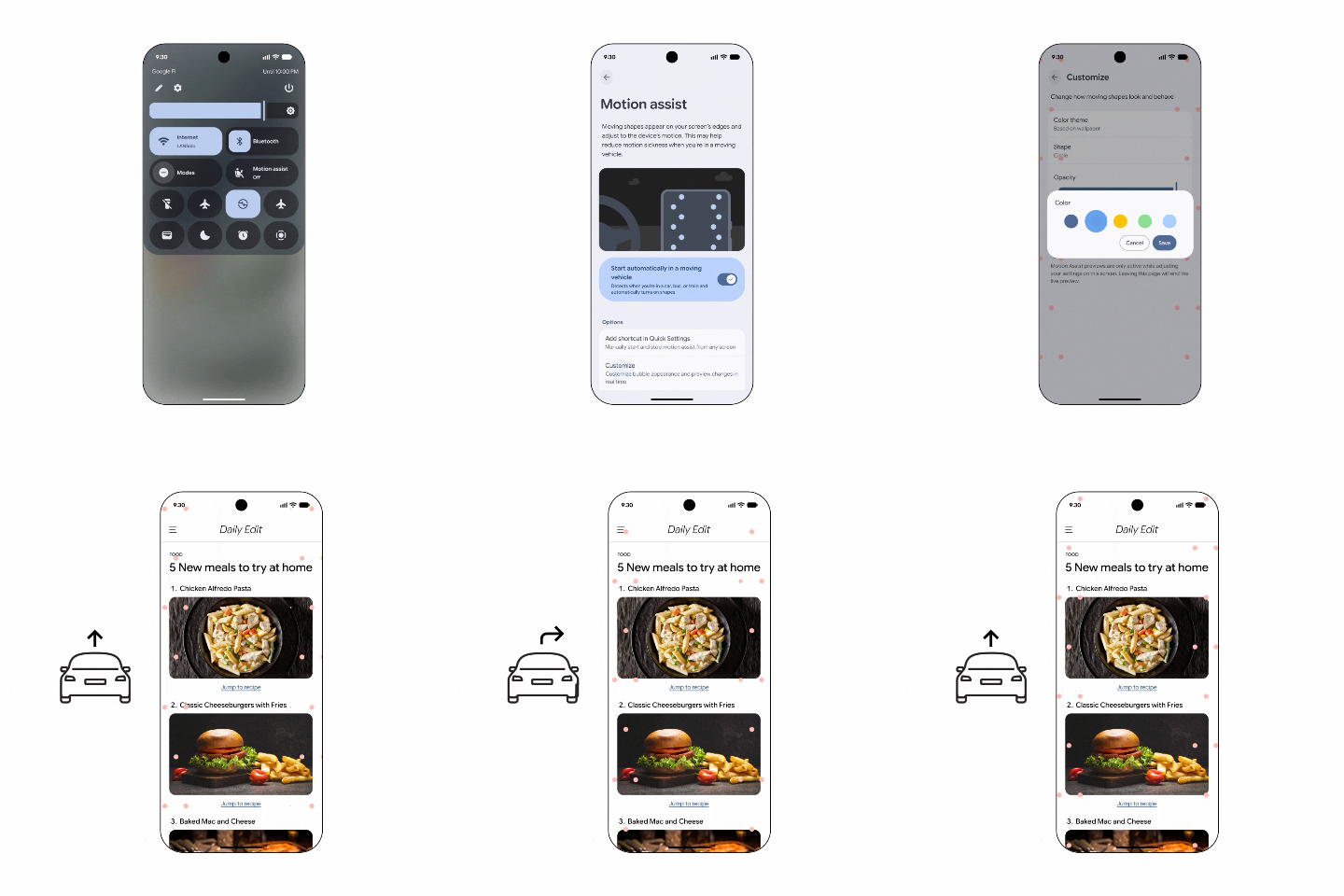
Another significant new feature, Motion Assist tries to minimize discomfort experienced by some people when using their smartphones in a car or other moving vehicles. The principle involves a set of discreet bubbles displayed on the screen that move in accordance with the vehicle’s movements to align the visual information perceived by the eyes with that detected by the inner ear.
The delay between these two signals is one of the factors associated with motion sickness. Reading static text on a screen while the body feels accelerations, turns, or braking can lead to nausea or dizziness for some users.
Google allows Motion Assist to be activated automatically during a trip, added to quick settings, and users can modify the appearance of the bubbles, including their shape, color, and opacity.
Google arrives after Apple, OPPO, and Vivo
However, Motion Assist is not a completely new idea. Apple already offers Vehicle Motion Cues in iOS 18, with animated points placed around the screen and synchronized with the movements of the vehicle.
OPPO and Vivo have also developed their own variants of this technology.
Google arrives relatively late, but its integration directly into Android 17 could give the feature a much broader reach over time. It won’t necessarily be limited to Pixel devices and could gradually be adopted by various manufacturers using the new version of the system.
As with any such feature, its effectiveness may vary from person to person. Motion Assist should not be viewed as a universal medical solution but as a tool intended to reduce discomfort in certain situations.
Guided Vision transforms Gemini Live into a visual assistant
The September Drop also adds Guided Vision, a new accessibility feature integrated into Gemini Live. This feature allows you to share your smartphone’s camera with Gemini and receive voice descriptions of what’s in front of you. Google specifically mentions reading small inscriptions on packaging, checking a menu in a dimly lit restaurant, or searching for an item in a room.
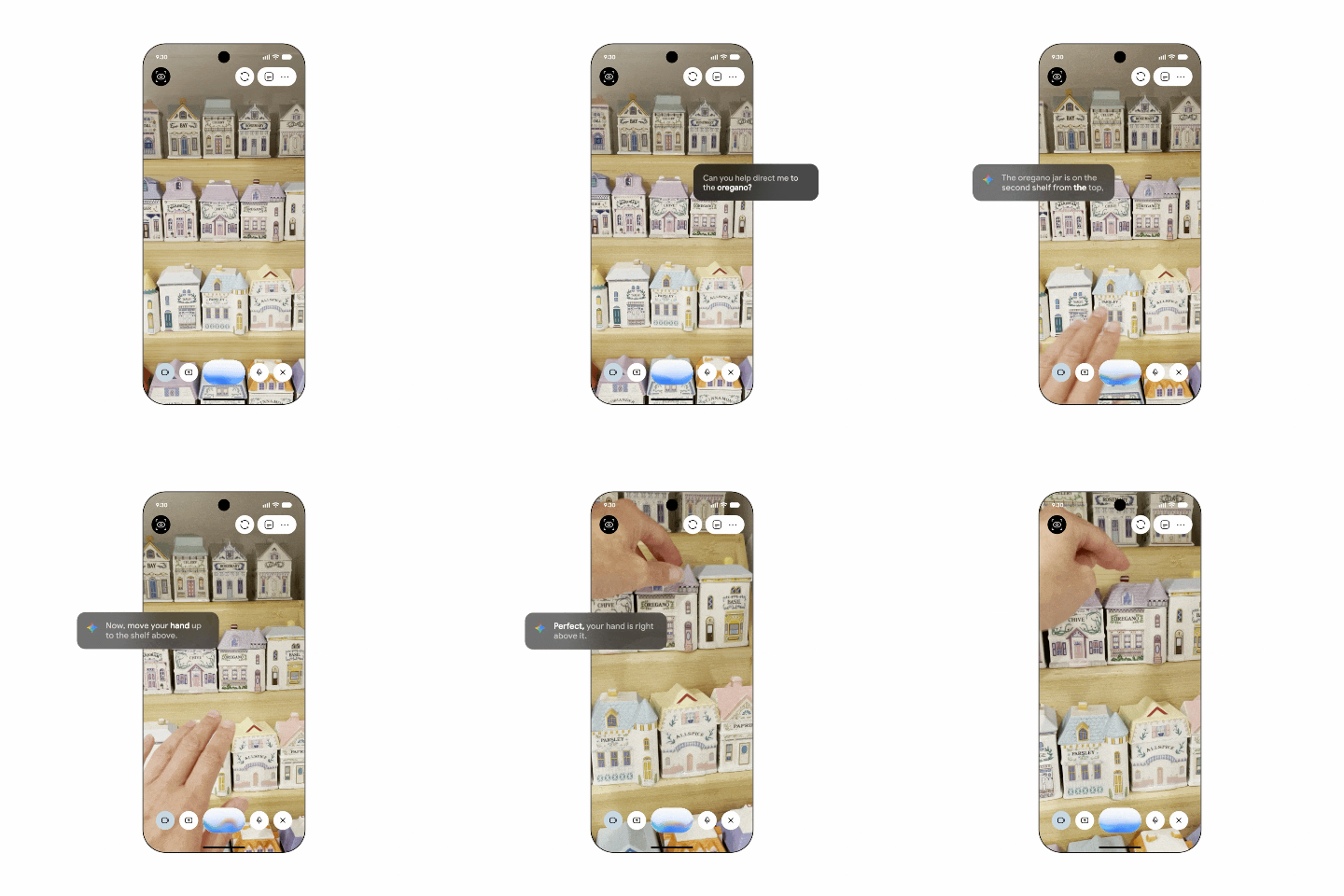
The advantage of Guided Vision primarily lies in its interactive nature. If the camera isn’t properly oriented, Gemini can verbally guide the user by asking them to move their phone or scan a scene in a different direction.
This feature is primarily designed for blind or visually impaired individuals and can be launched from accessibility shortcuts or directly from the TalkBack menu.
It is expected to be available soon on devices running Android 9 or later in regions where Gemini is accessible.
Google Keep is now integrated into Google Messages
Google is also bringing Messages and Keep closer together. From the “+” icon in a Google Messages conversation, users can now open a Keep note or list and share it with other participants. A shopping list, travel notes, or a selection of ideas can be consulted and edited by all members of the discussion without leaving Messages.
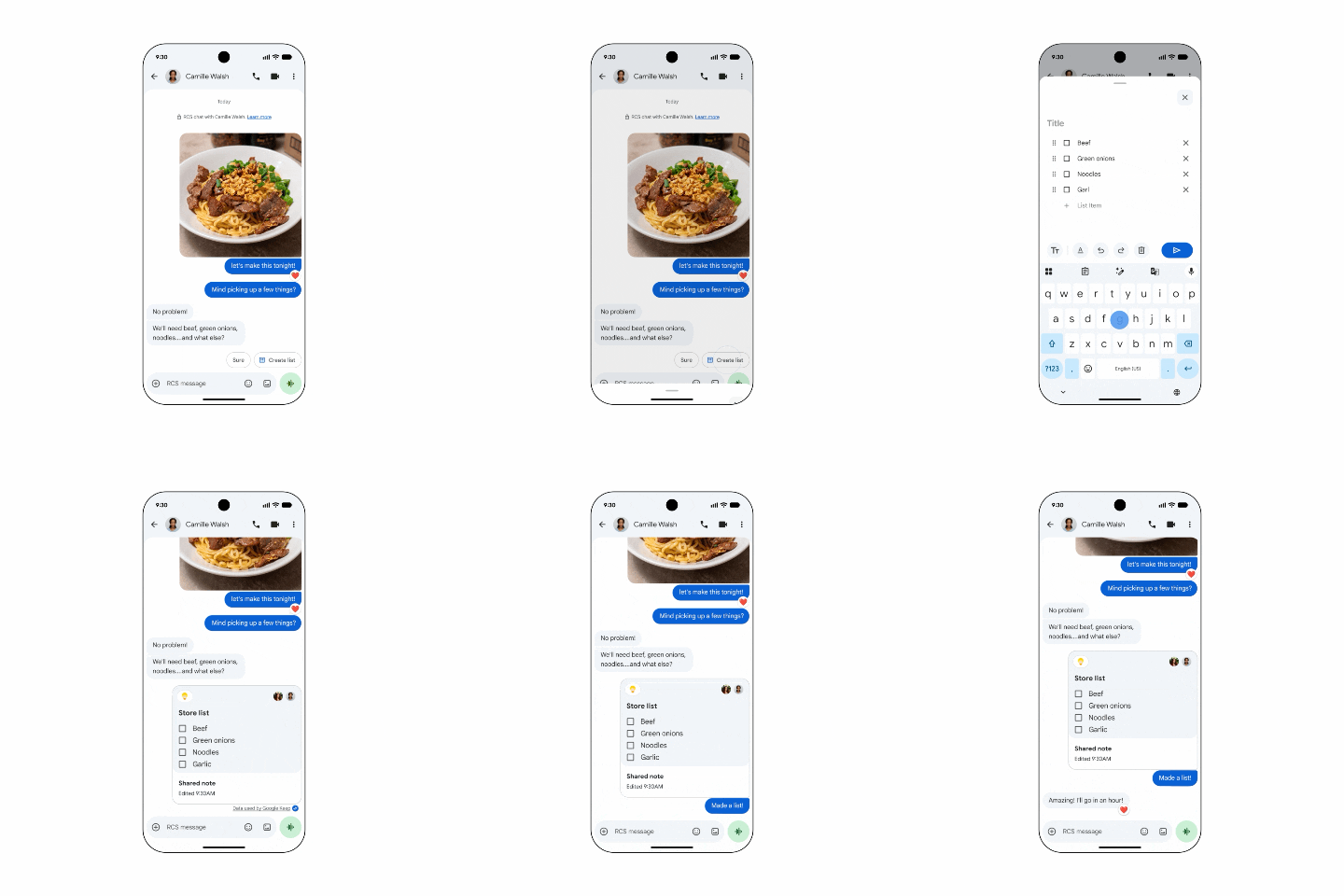
The integration is straightforward, but it exemplifies Google’s current strategy: better connecting its services rather than allowing them to function as standalone applications.
For organizing a trip or managing a shared list, the constant switching between Messages and Keep becomes unnecessary. The collaborative document is now directly integrated into the context of the conversation.
Conversations are also now customizable
The final new feature concerns conversation themes in Google Messages. Each conversation can now have its own background, whether it’s a background provided by Google or a personal photo. The message bubbles can then automatically adopt colors that complement the chosen image, with the option to manually select other shades.
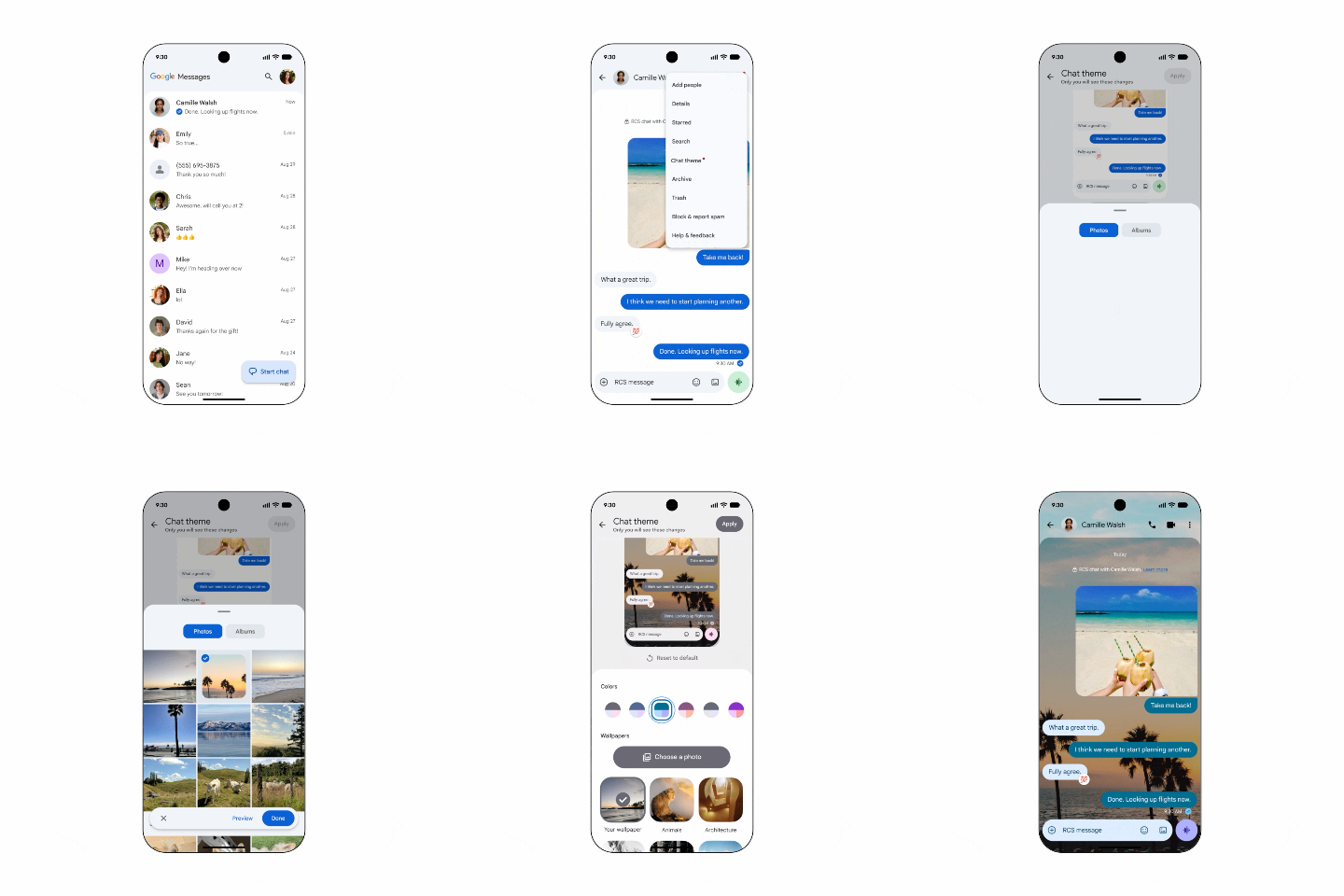
This is primarily an aesthetic function, already common in several competing applications, but it adds more personalization to Google Messages.
Google continues to enrich its messaging app as RCS plays an increasingly significant role in communications between Android and iPhone smartphones.
Not all features require the same version of Android
One notable aspect of this September Drop is the varied technical requirements. Google is not distributing these new features as a block dependent on a single system update, but mainly through its applications and services.
The chat theme is already available in Google Messages, while the integration of Google Keep is beginning to roll out. Motion Assist requires Android 17, whereas the item memorization in Find Hub works from Android 16. Guided Vision will be much more accessible as it is expected to function from Android 9.
This fragmentation may slightly complicate the understanding of the update, but it also has an advantage: Google can deliver some important functions to relatively older smartphones without relying on a complete update from manufacturers.
Feature Drops are no longer just for Pixel
This evolution also illustrates how Google has gradually changed its approach to evolving Android. New features no longer necessarily come through a major system version. Gemini, Messages, Find Hub, or Google Play services can evolve independently and add new capabilities to millions of already released devices.
The result may be less spectacular than a grand annual launch but often more useful.
A user doesn’t need to own the latest Pixel 11 Pro or Galaxy S26 Ultra to enjoy all the new features announced this month. Some are accessible on devices that were released several years ago.
This is a significant advantage against the historical fragmentation of Android.
Find Hub is probably the most interesting feature
Motion Assist is likely the most visually impressive new feature, especially as it directly responds to Apple’s Vehicle Motion Cues. However, the ability to memorize items in Find Hub could have a more regular impact in daily life.
We have many more items that are likely to be misplaced than we have trackers to keep track of them. The idea of simply asking Gemini to remember where something was stored is therefore a much lighter solution. It relies on relatively simple technology—recording a note, a location, and potentially a photo—but the integration with Gemini removes almost all friction. You just need to say it when the item is stored.
This type of use case is likely what will help Gemini become truly useful on Android. Not necessarily by performing spectacular demonstrations, but by taking care of small tasks the user has been forgetting to note themselves.
With this September Drop, Google is showing a clear direction: AI should not merely exist in a chat window. It should gradually blend into Android, remember context, and intervene in applications where its assistance becomes truly relevant.



