

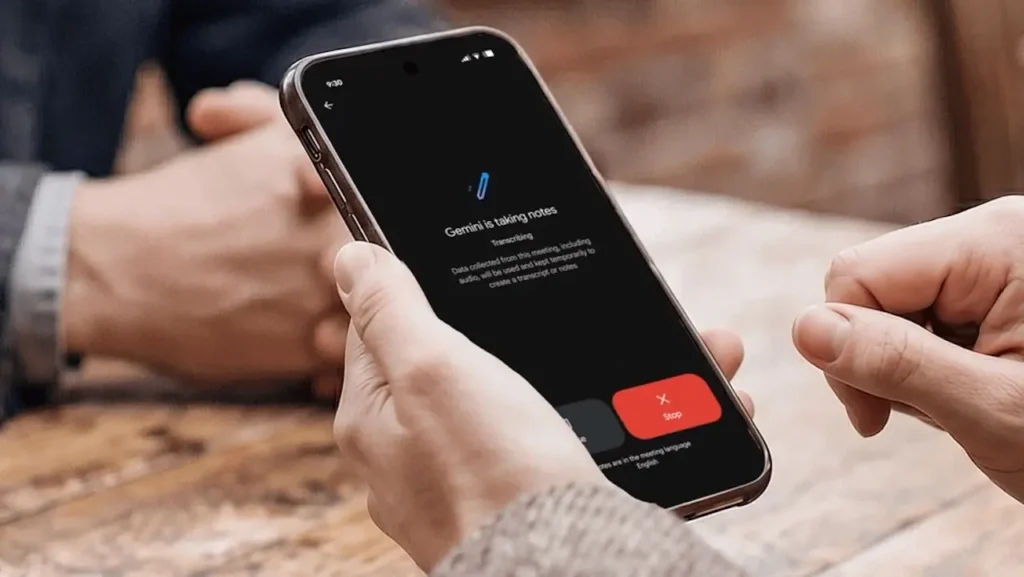
Google Meet can now take notes during your in-person meetings thanks to Gemini
Google Meet aims to be more than just a video conferencing tool. With its new “Take Notes for Me” extension, Gemini can now listen to a physical meeting, extract key points, and automatically generate a summary in Google Docs.
This subtle yet strategic evolution transforms Meet into a true meeting assistant.
Gemini Expands Beyond Video Conferencing
Previously, Google Meet’s automated note-taking feature was primarily designed for video calls. Google is now extending its functionality for a much more common scenario: in-person meetings.
The feature was announced during Google Cloud Next 2026, held in April in Las Vegas. Google emphasized its goal to enable Gemini to produce summaries and actionable follow-ups, regardless of the nature of the meeting, including those that take place physically or even on other platforms like Zoom or Microsoft Teams.
This feature addresses a familiar frustration: genuinely participating in a discussion while simultaneously trying to note every important decision.
Google now seeks to delegate this secondary task to Gemini.
How Does In-Person Note Taking Work?
The process is intentionally straightforward. From the Google Meet homepage, whether on mobile or the web, users can initiate “Take Notes for Me” without necessarily joining a traditional video conference. The device’s microphone captures the conversation happening in the room.

Gemini then analyzes the discussions to produce a structured document that includes a summary of the conversation and the next identified actions. Google’s documentation also states that “Take Notes for Me” can automatically organize notes in Google Docs and share them with relevant individuals based on defined settings. Once the session concludes, the document is saved in Google Drive, and the document owner or authorized participants may receive an email containing a link to the generated notes.
In other words, Google Meet no longer needs to be the platform where the meeting occurs; it becomes the tool that retains the memory of the meeting.
Summaries, Decisions, and Action Items
The functionality goes beyond mere raw transcription. Google Meet can structure the discussions into several categories, including a general summary, decisions made, next steps, and additional details on discussed topics. Google also allows adjustments to the note length and accessibility settings.
This differentiation is crucial.
An exhaustive transcription can quickly become as difficult to navigate as the meeting itself. In contrast, Gemini aims to convert several minutes of conversation into immediately actionable information.
As a result, the final document becomes less of a record and more of a meeting outcome: what was decided, what remains to be done, and potentially, who needs to act next.
However, Google recommends using this feature for meetings lasting at least 15 minutes and up to eight hours. The company also notes that the generated summaries may sometimes be incomplete or inaccurate.
Google Accelerates AI Integration in Meet
This extension arrives at a time when automated note-taking has already become one of the most utilized AI features in Google Workspace. At Cloud Next 2026, Google reported that over 110 million participants had used “Take Notes for Me” in the previous month, marking an 8.5-fold increase over the past year. These figures partly explain why Google is now looking to extend the feature beyond the traditional video conferencing setting.
Slowly, Google Meet is evolving into an interface that allows Gemini to engage throughout the entire meeting process: preparation, note-taking, summarization, and follow-up.
In this sense, the product is no longer just in competition with Zoom or Microsoft Teams. Rather, Google aims to make Workspace an intelligent layer that supports work before, during, and after a conversation.
Android to Lead the Rollout, Followed by Web and iOS
The rollout is gradual across platforms. Google announced that widespread deployment on Android began on August 11, 2026, with web deployment starting on August 14, 2026. iPhone and iPad users will need to wait longer, as the feature is expected to arrive later.
As is often the case with Google Workspace, an extended rollout means that it may take several days for the functionality to become available across all eligible accounts. Regarding subscriptions, Google indicates that the feature is included with Business Standard, Business Plus, Enterprise Standard, Enterprise Plus, Google AI Pro, Ultra, and Frontline Plus plans.
For businesses, it remains tied to existing administrative settings in Google Meet and the organization’s note-taking policies.
Privacy Considerations Become Essential
Having an AI listen to a video conference is one thing. Placing a phone in the middle of a room to analyze an in-person conversation is another. The expansion of “Take Notes” to in-person meetings raises critical questions of consent and governance. Google is already working on mechanisms that will allow administrators to require explicit consent before features like note-taking, recording, or transcription are used. In Meet, participants are also informed when Gemini is taking notes.
In a professional setting, the stakes go beyond simple user convenience: some discussions may contain sensitive financial, legal, strategic, or personal information.
The tool’s effectiveness will depend on both the quality of its summaries and the ability of companies to precisely define where and when it can be utilized.
Google Meet Gradually Becomes an Assistant Rather Than a Video App
This update underscores a deeper shift within Google Workspace. For a long time, each tool had a relatively clear purpose: Gmail for email, Docs for writing, Drive for storage, and Meet for video calls.
Gemini is progressively blurring these boundaries.
An in-person conversation can now start in a meeting room, be captured by Meet, structured by Gemini, saved in Docs, and later found in Drive. Users no longer manipulate several applications; they entrust AI with facilitating information flow among them. This is precisely where Google may hold an advantage over a multitude of standalone transcription or note-taking tools: Gemini is directly integrated into the ecosystem where work continues after the meeting.
Automated note-taking might seem trivial at first glance. However, it reveals a far-reaching ambition: to make AI the permanent memory of daily work.
And if this approach takes hold, the most important button in an upcoming meeting might no longer be “Join,” but rather simply “Take Notes.”



