

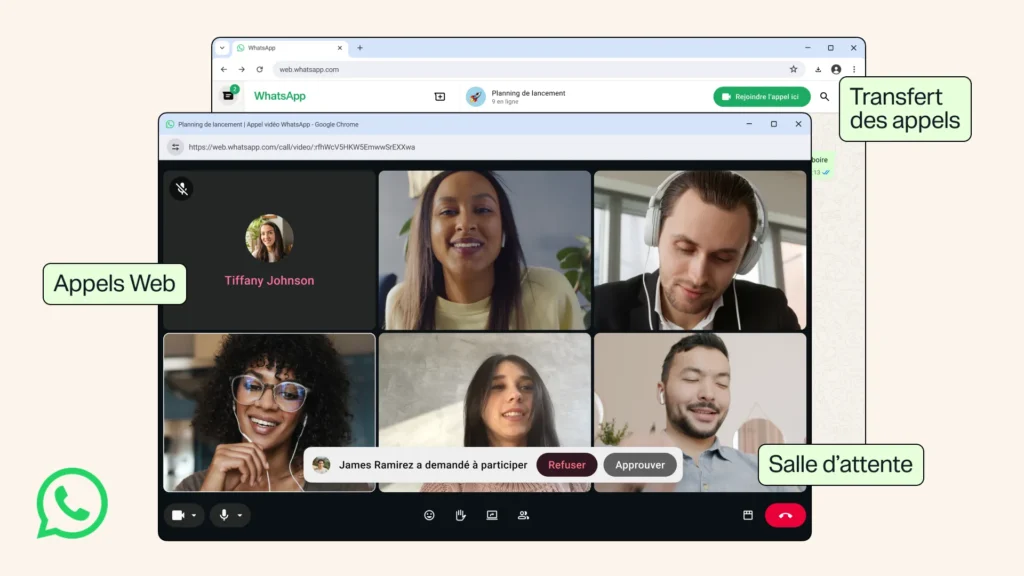
WhatsApp Web allows for audio and video calls with new meeting functions
After years of anticipation, WhatsApp Web finally catches up with its mobile and desktop counterparts. Meta has rolled out a major update, enabling users to make and receive audio and video calls directly from a browser, without requiring the desktop application.
This update comes with several new features aimed at enhancing calls, including device continuity, waiting rooms for group conversations, and improved video quality from the outset.
Calls finally come to WhatsApp Web
Previously, WhatsApp calls were exclusively available through the mobile app or dedicated desktop client. With this update, WhatsApp Web has introduced a “Calls” tab that consolidates call history, favorite contacts, and options to initiate audio or video calls directly from the browser.
The web version also adopts multiple features already present in the desktop application, such as screen sharing and real-time reactions during calls. This development enhances the appeal of WhatsApp Web for users who primarily work from their browser.
Seamlessly switch between devices during calls
Meta also introduces a highly anticipated continuity feature. Users can now transfer an ongoing call from one device to another without hanging up. Essentially, when a user receives a call on WhatsApp Web or the desktop app, they can instantly continue the conversation on their smartphone without interrupting the communication.
This capability brings WhatsApp closer to services like FaceTime or Google Meet, which already offer a seamless experience across multiple devices.
Waiting rooms for better control of group calls
Group calls are also gaining more flexibility. Meta is adding a waiting room system, allowing organizers to control access to meetings. When creating a call link, there will be an option to “Require approval to join.”
Participants must be manually approved before joining the conversation.
This new feature is particularly aimed at professional use, where better participant control is often necessary.
Enhanced audio and video quality
WhatsApp is also taking this opportunity to optimize communication quality. Among the announced improvements are background noise reduction to minimize disturbances in noisy environments, and high-definition display right from the start of video calls.
Previously, many users noticed a delay before HD quality kicked in. Meta now promises a much quicker quality upgrade.
Usernames complement WhatsApp’s communication strategy
This update comes shortly after the introduction of future usernames on WhatsApp. Once this feature is rolled out widely, users will be able to contact others via their username instead of their phone number, including for initiating calls across different platforms.
By integrating these new identifiers with web calls, Meta continues to transform WhatsApp into a more comprehensive communication platform, catering to both personal and business needs.
Meta brings WhatsApp closer to video conferencing platforms
With the introduction of browser calls, WhatsApp takes a significant step forward in its evolution. The messaging app is no longer limited to mobile conversations and is gradually establishing itself as a multi-platform communication solution capable of competing with major video conferencing tools.
This strategy also reflects Meta’s ambition to make WhatsApp a central service for daily communications. With support for web calls, waiting rooms, device continuity, and the upcoming usernames, the platform continues to expand its capabilities. While not aiming to replace dedicated professional solutions, WhatsApp is slowly narrowing the gap that separates it from its competitors in online collaboration and communication.



