

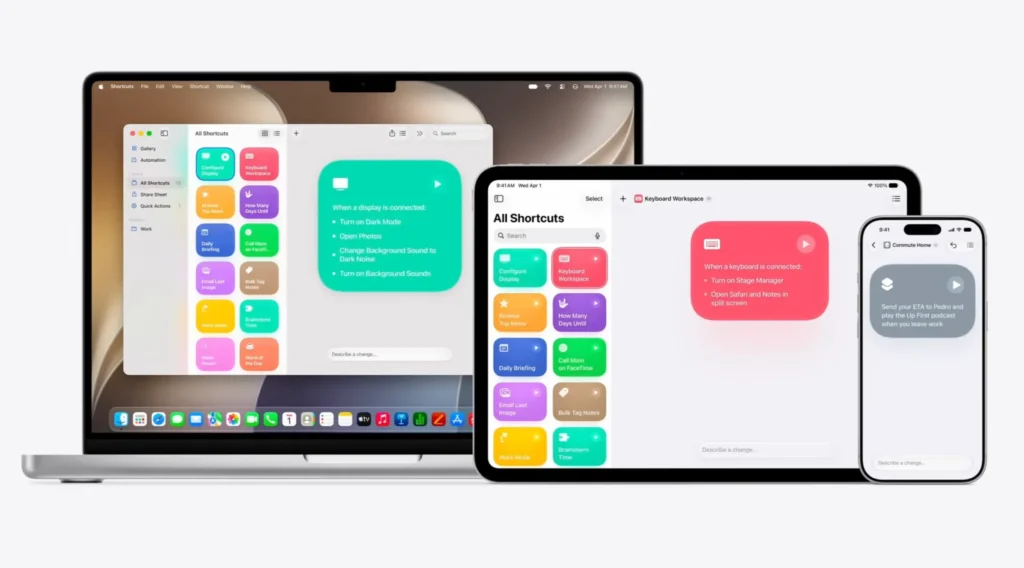
iOS 27 Transforming Shortcuts: Apple Intelligence Makes Automation Accessible to All
For years, Shortcuts has been one of the most powerful features on the iPhone yet one of the least utilized. With iOS 27, Apple aims to change this dramatically. Thanks to Apple Intelligence, creating complex automations no longer requires manually assembling dozens of actions. A simple phrase in natural language is now enough.
This evolution could transform Shortcuts, which have long been reserved for advanced users, into a mainstream tool that democratizes automation on the iPhone.
The Main Issue with Shortcuts Wasn’t Power, but Complexity
Since its introduction, Shortcuts has allowed users to automate nearly any task on the iPhone, iPad, or Mac. Whether sending a message automatically, launching a series of apps according to the time of day, generating daily reports, or controlling smart devices—the possibilities are nearly endless.
The problem is that creating these automations often required understanding the logic of actions, knowing compatible apps, manually assembling each step, and testing and correcting errors.
For many users, the learning curve was simply too steep.
Apple seems to have finally recognized this major hurdle.
Apple Intelligence Becomes the Engine for Shortcuts
With iOS 27, creating a shortcut now begins with a simple description. The user describes what they want to achieve, and Apple Intelligence handles the rest.
Instead of manually assembling the various actions, the system analyzes the request, identifies the relevant apps, and automatically constructs the necessary workflow.
The example presented by Apple during WWDC 2026 perfectly illustrates this new approach.
A user can simply write: “When I leave the office, send a message to Pedro with my estimated arrival time.” In the background, Apple Intelligence detects the workplace, creates a geographical trigger, calculates the route via Maps, estimates the arrival time, automatically generates the message, and sends it via Messages.
A process that would have previously taken minutes to configure is now created in seconds.
Editing an Automation Is as Simple as Creating One
Apple has not stopped at merely generating the initial automation. If the created shortcut doesn’t perfectly match expectations, the user can simply request a modification in natural language. For example: “Add the forecasted weather at arrival” or “Send the message only on weekdays.”
Apple Intelligence then automatically adjusts the existing automation without requiring manual intervention.
This conversational approach brings Shortcuts closer to modern AI assistants than to traditional automation tools.
A Feature That Could Finally Popularize Automation
The significance of this innovation extends far beyond Shortcuts itself. For years, Apple has had a powerful automation engine that has been underutilized. The majority of users have never created a single custom shortcut.
By removing the technical barrier, Apple potentially opens the door to millions of new users.
Automation could then become as natural as using a voice command or searching in Spotlight. This evolution aligns perfectly with Apple Intelligence’s broader strategy: to make complex technologies invisible to the end-user.
A Major Challenge for Apple Intelligence
However, one essential question remains: how far can this AI-assisted automation truly go? Creating a simple shortcut is one thing. Constructing advanced workflows involving multiple apps, numerous conditions, and complex processing is another.
Experienced Shortcuts users know that certain automations can quickly attain a level of sophistication akin to genuine scripts.
Apple will need to demonstrate that its AI can handle these scenarios without introducing errors or unexpected behaviors. The success of this feature will largely depend on the system’s ability to understand the user’s intention precisely.
One of the Most Important Changes in iOS 27
Amid the spectacular announcements surrounding Siri AI or new photo features, this evolution of Shortcuts could easily go unnoticed. However, it could have a significant impact on users’ daily experience.
Apple is not merely trying to simplify Shortcuts. The company is attempting to transform automation into a natural function of the iPhone, accessible without specialized technical knowledge.
If the promise is fulfilled, iOS 27 could mark the moment when automation finally moves beyond the realm of enthusiasts to become a feature embraced by the general public. In the Apple ecosystem, this type of democratization often has a more significant impact than a flashy innovation meant for a select group of expert users.



