

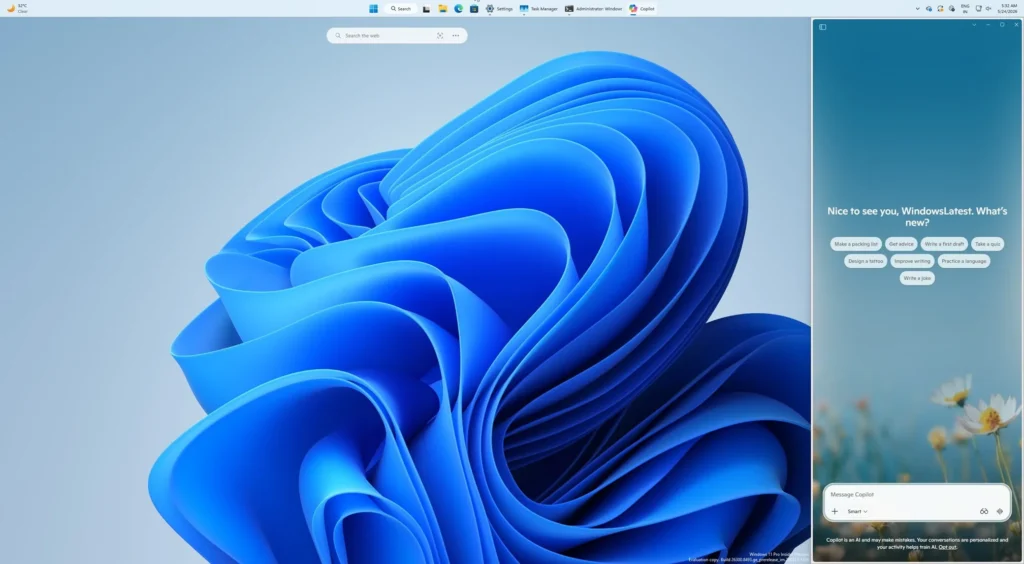
Microsoft revives the idea of a sidebar Copilot in Windows 11
Microsoft continues to explore the role of artificial intelligence in Windows 11. After several iterations of Copilot, the company is now revisiting a concept it had previously abandoned: transforming the AI assistant into a persistent sidebar.
This new approach is starting to appear in recent versions of Windows 11 and highlights a key point: Microsoft is still searching for the right way to integrate AI into the core of the PC experience without being intrusive.
Copilot can now be anchored to the side of the screen
Until now, Copilot primarily functioned as a standalone application opened in a traditional window. However, Microsoft is now introducing new functionality accessible via a dropdown menu in the title bar, which allows users to anchor Copilot to the left or right side of the screen with dedicated layout options.
Visually, this resembles the native Snap Layouts of Windows 11, but it is actually an independent system specifically designed for Copilot.
Once activated, the AI becomes a true persistent sidebar: it remains visible while using other applications, Windows automatically reorganizes the remaining space, and the work environment dynamically adapts around the AI panel.
Microsoft also offers a picture-in-picture mode for those who prefer a more discreet way to keep Copilot accessible.

An idea abandoned… then revived
The most noteworthy aspect is that Microsoft had previously attempted exactly this approach when Copilot was first introduced in Windows 11. At that time, the assistant appeared as a sidebar panel capable of interacting with content displayed on the screen. However, this initial implementation was quickly removed.
The reason? According to various reports, the old version relied heavily on web technologies via an Edge-based wrapper, which limited performance and native integration with the system.
Microsoft then transformed Copilot into a separate application to simplify its evolution and deployment.
The return of this sidebar interface indicates that the company has never truly abandoned the idea of having a constantly present assistant on the screen.
Microsoft is still seeking the “right” form of AI on PC
This evolution primarily illustrates the current hesitations within the tech industry regarding AI interfaces. For years, operating systems have been designed around applications. The advent of generative assistants completely disrupts this logic: should there be an invisible AI? A floating window? A permanent sidebar? An omnipresent system layer?
For Microsoft, the challenge is particularly complex.
The company wants to make Copilot the central component of Windows while avoiding criticisms about intrusion or visual overload. The recent relaxation regarding the uninstallation of Copilot shows that Microsoft is beginning to recognize this tension.
With this new sidebar, the firm seems to be searching for a compromise: making AI permanently accessible without fully monopolizing the interface, while also granting users greater control.
The future of Windows might become much more contextual
The big question now revolves around Copilot Vision and future contextual interactions. If Microsoft effectively connects this sidebar to functions capable of real-time analysis of what is happening on the screen, Windows could gradually evolve into a much more proactive interface.
The OS would then no longer simply be an environment for launching applications, but rather a space where AI continuously supports tasks, multitasking, and productivity.
It remains to be seen if users are ready for this vision of the PC.
As AI becomes increasingly omnipresent in Windows, the line between a useful assistant and a permanent presence also begins to blur.



