

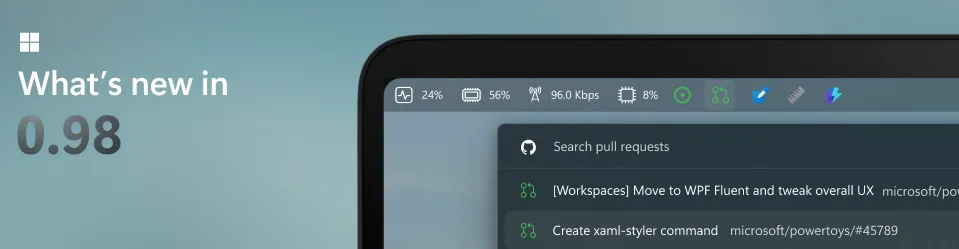
Microsoft PowerToys 0.98.0: The update that makes Windows finally ultra-flexible
Microsoft continues to refine its toolkit for advanced users with the release of Microsoft PowerToys v0.98.0. This new version brings several significant improvements, including a completely redesigned Keyboard Manager, a Command Palette Dock that is always accessible, and a notable enhancement to CursorWrap for multi-screen setups.
It’s not a revolutionary overhaul, but rather a series of targeted adjustments that make Windows more adaptable—especially for those who spend their days juggling windows, shortcuts, and screens.
A Keyboard Manager That Is Finally Cohesive and Modern
The Keyboard Manager has made a significant leap forward. Completely rebuilt with WinUI 3, it abandons its previous fragmented logic to offer a unified interface.

Specifically:
- Manage keys and shortcuts within a single window
- Ability to enable/disable each remapping individually
- New shortcut Win + Shift + K for quickly enabling/disabling the tool
This change may seem minor, but it corrects one of PowerToys’ historical flaws: a sometimes powerful experience… but not always smooth.
A Command Palette Dock Always at Hand

Another interesting new feature is the Command Palette Dock. Unlike the classic palette that appears on demand, this dock can remain anchored to an edge of the screen (top, bottom, left, or right). It provides immediate access to: applications, frequent commands, and extensions—all customizable with a simple right-click.

This type of tool can transform daily usage: less searching, fewer interruptions, and more direct navigation.
CursorWrap Finally Becomes Reliable for Multi-Screens
The CursorWrap module has been completely rewritten to better manage complex setups.

Key improvements include:
- Better handling of irregular screen layouts
- Conditional activation only with Ctrl or Shift
- Ability to automatically disable on a single screen
For multi-monitor users, this is a significant improvement. CursorWrap finally becomes a reliable tool rather than an experimental gadget.
Small Improvements, Big Impact in Daily Use
Microsoft also introduces a handy new feature: the Always On Top function allows you to pin a window directly via a right-click on the title bar, without needing to use a keyboard shortcut.

Individually, these additions might seem modest. Collectively, they represent a clear direction: to make Windows more modular, more customizable, and above all, more aligned with real-world usage.
PowerToys, Still the Secret Weapon for Power Users
For the past few years, PowerToys has established itself as an idea laboratory for Windows. It’s not a consumer product, but it’s often where Microsoft tests what the system might become in the future.
With this version 0.98, the logic continues: simplifying what was complex, making accessible what was hidden, and adapting Windows to users rather than the other way around.
And this may be its true strength: not seeking to change everything, but precisely improving what saves time every day.



