

Chrome Android: The Desktop-style Favorites Bar Finally Arrives on Your Tablets
Google continues to refine the Android experience on larger screens. With the latest update to Chrome, the browser introduces a favorites bar inspired by its desktop version, now easily accessible below the address bar. This long-awaited change aims to simplify a well-known pain point: quickly accessing saved sites.
However, as is often the case with Android, this new feature will not be immediately available to everyone.
A Favorites Bar That Brings Android Closer to the Desktop Experience
Previously, accessing favorites on Chrome for Android was a bit of an obstacle course: three-dot menu, “Favorites” section, then navigating through folders. It’s not a huge issue, but it’s nowhere near as efficient as the desktop version.
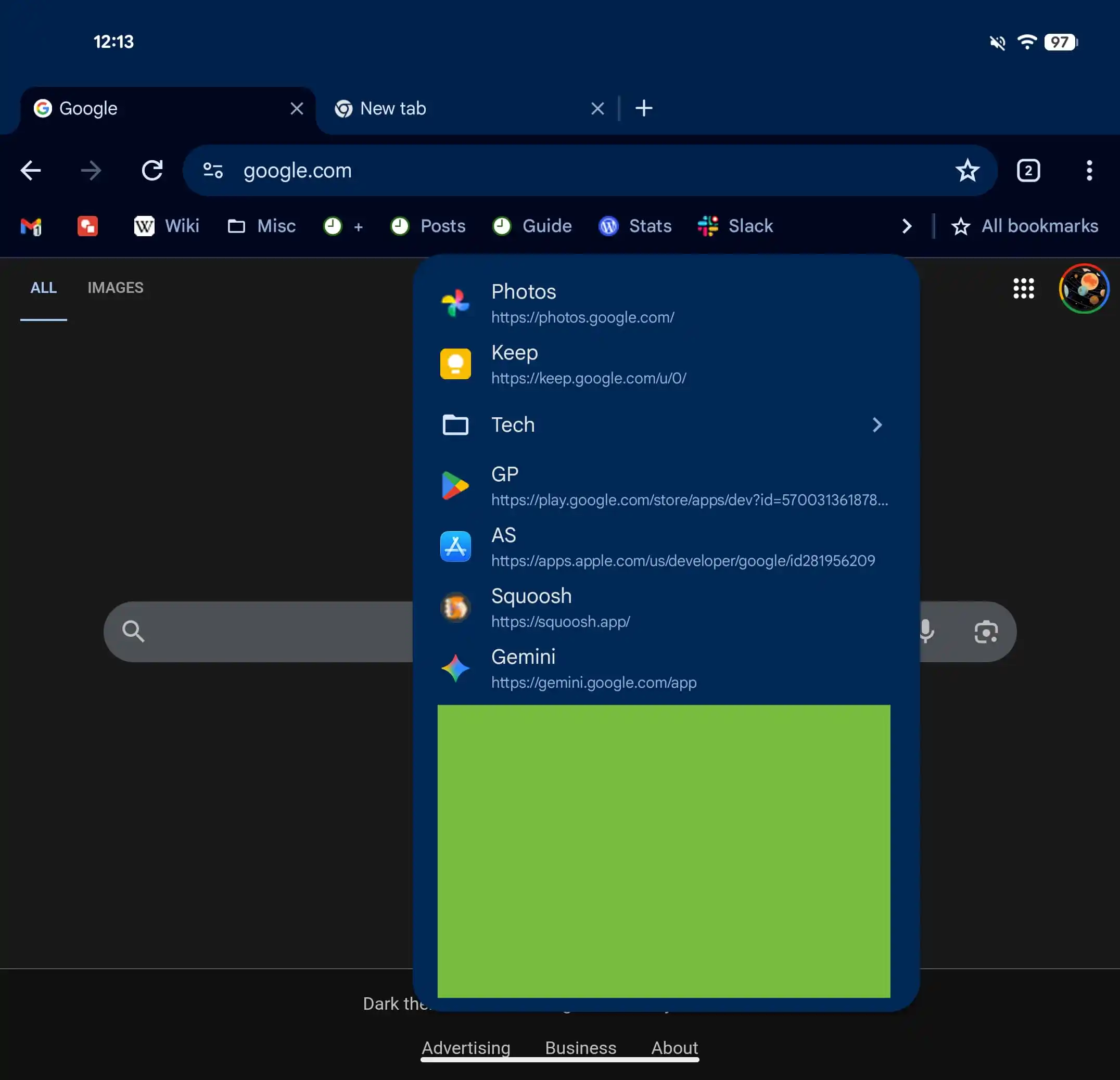
With this update, Google is changing the game. Favorites now appear directly below the omnibox, as icons alongside their names, just like on a PC. A button at the end of the bar allows access to unseen items and folders, while a “All Favorites” shortcut directs users to the full interface.
Another interesting detail: a long press on a favorite displays its full URL, adding a finer level of control.
A Feature Designed for Larger Screens
This evolution is significant. It forms part of a broader strategy by Google to enhance the experience on tablets and foldable smartphones, where the display space allows for interface elements that are closer to desktop design. Currently, the favorites bar is not available on regular smartphones. It is limited to larger-screen devices, particularly tablets and foldables in unfolded mode, on Chrome version 146.
The rationale is straightforward: on a narrow screen, a permanent favorites bar would take up precious vertical space. Therefore, Google has opted to hide the feature by default on “narrow screens.”
This does not rule out the possibility of an adapted version for smartphones in the future, but no announcements have been made in this regard yet.
A Partially Manual Activation
Another point to note: the feature is not always automatically activated. To benefit from it, users must navigate to: Settings > Appearance > Show favorites bar. If it doesn’t appear, a trip to chrome://flags may be necessary to force its activation. As is often the case with Google, deployment is gradual, meaning that even compatible devices may have to wait a few days (or weeks).
On paper, the addition of a favorites bar might seem trivial. In practice, it addresses one of the most frequent tasks on the web: quickly accessing favorite sites.
This change also highlights an underlying trend. Android — and Chrome in particular — is increasingly aiming to blur the line between mobile and desktop, especially on hybrid devices like tablets and foldables. By bringing the browsing experience closer to that of a computer, Google is not just adding a function; it is progressively redefining what it means to “browse on mobile” in the age of large screens.
In this transition, even a detail like a favorites bar can truly enhance daily comfort.



